How Much Does It Cost to Build a WordPress Website in 2026?

Building your own WordPress website costs roughly $50-$200 for the first year if you handle setup yourself, covering a domain, hosting, and optional premium theme or plugins. Hiring a freelancer typically runs $500-$5,000, and a full agency build ranges from $3,000 to $35,000 or more, depending on complexity. WordPress itself is always free, what you’re actually paying for is hosting, your time, and optionally, someone else’s expertise.
Before You Start
This guide assumes you’re deciding between building your own WordPress site versus paying someone else to do it. If you’ve already decided to DIY, see our installation guide to get started directly.
“How much does a WordPress website cost” is a bit like asking how much a car costs, the honest answer is that it depends entirely on what you’re building and who’s building it. WordPress itself is free and open source, but a complete, professional website still involves real costs. This guide breaks down exactly what those costs are, for both the DIY route and hiring it out.
What You’ll Learn
- The realistic cost breakdown if you build your own site
- What each individual cost component actually covers
- What hiring a freelancer or agency typically costs, and when it makes sense
- Which costs are one-time versus ongoing
The DIY Cost Breakdown
If you’re building your own site, following the approach covered throughout WebGomu, here’s a realistic first-year budget:
| Item | Typical Cost | Required? |
|---|---|---|
| WordPress software | Free | Yes |
| Domain name | $10-$20/year | Yes |
| Hosting | $3-$15/month ($36-$180/year) | Yes |
| SSL certificate | Free (via most hosts) | Yes |
| Theme | Free to $200/year for premium | No, free options are genuinely solid |
| Plugins | Free to a few hundred dollars/year for premium tiers | No, free tiers cover most beginner needs |
| Security (beyond free plugin tier) | $0-$100/year | No, free security plugins are solid for most sites |
Realistically, a bare-minimum, fully functional DIY site costs somewhere between $50 and $200 for the first year, mostly just domain and hosting, if you stick with free themes and plugins, which is genuinely a legitimate long-term choice, not just a starting point to outgrow.
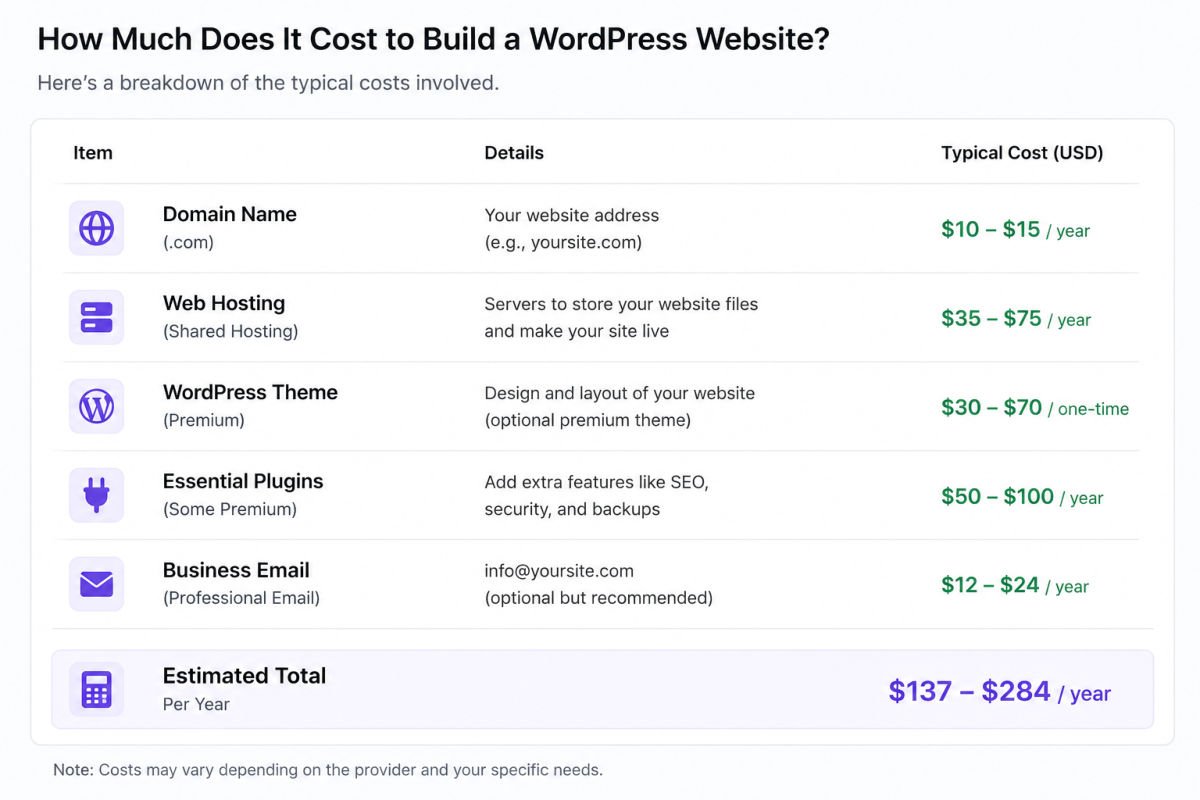
What Each Cost Actually Covers
Domain Name
Your site’s address. See our domain name guide for how to choose one well.
Hosting
Where your site’s files actually live. This is the one cost you genuinely can’t skip. See our hosting guide for how to choose without falling for the renewal-price trap.
Theme
Free themes from the WordPress.org directory are professionally reviewed and genuinely sufficient for most sites. Premium themes add convenience and pre-built templates, worth it once you know exactly what you need. See our theme selection guide.
Plugins
The free tiers of essential plugins (SEO, security, backups, forms) cover the real foundation of most beginner sites. See our plugin recommendations.
WebGomu Tip: Don’t budget for premium themes or plugins before you’ve actually used the free versions for a while. Most beginners never hit a real limitation that requires upgrading, and the ones who do will know exactly why by that point, rather than guessing upfront.
What Hiring It Out Typically Costs
If DIY isn’t the right fit for your situation, here’s what the alternative looks like:
| Option | Typical Cost | Best For |
|---|---|---|
| DIY (yourself) | $50-$200 first year | Anyone willing to learn, tightest budget |
| Freelancer | $500-$5,000 | A more custom design, without full agency overhead |
| Agency | $3,000-$35,000+ | Larger businesses needing full-service design, strategy, and support |
These figures vary widely across sources and projects, treat them as a general planning range, not a fixed quote. A simple one or two-page freelance project sits at the low end; a complex, custom-designed business site with unique functionality pushes toward the higher end of any of these ranges.
Ongoing Costs to Budget For
Beyond the initial build, plan for these recurring costs regardless of which route you take:
- Hosting renewal — often higher than your first-year intro price, see our hosting guide for why
- Domain renewal — typically $10-$20/year
- Any premium plugin or theme subscriptions — only if you’ve chosen to use them
- Maintenance — free if you’re doing it yourself (updates, backups), or a paid maintenance retainer if you’ve hired an agency
When DIY Makes Sense, and When It Doesn’t
DIY is a genuinely strong choice if you have some time to learn and a standard content or small business site in mind, which describes the majority of WebGomu’s own audience. Hiring out makes more sense if you need highly custom functionality, have zero time to learn the basics, or are launching something where downtime or mistakes carry real business risk from day one.
Common Mistakes
- Budgeting only for the first year’s intro hosting price, then being surprised by renewal costs.
- Assuming a premium theme or plugin is required to look professional, when free options are often genuinely sufficient.
- Hiring a freelancer or agency without a clear scope, leading to costs creeping well past the original estimate.
- Forgetting to budget for ongoing costs like renewals and maintenance, not just the initial build.
Recommended Tools
- A free WordPress theme from the official directory, a legitimate long-term choice, not just a placeholder
- Free tiers of essential plugins (SEO, security, backups, forms), sufficient for most beginner and small business sites
Key Takeaways
- WordPress itself is always free, real costs come from hosting, your time, and optional premium extras.
- A realistic DIY first-year budget is roughly $50-$200.
- Freelancers and agencies cost significantly more, but suit different needs, not necessarily better ones.
- Budget for ongoing renewal and maintenance costs, not just the initial setup.
Frequently Asked Questions
Is WordPress really free?
Yes, the WordPress software itself is completely free and open source. The costs come from hosting, a domain, and any optional premium themes or plugins you choose to add.
What’s the cheapest way to build a WordPress website?
Building it yourself, using free themes and plugins, paired with budget-friendly beginner hosting. This typically costs $50-$200 for the first year.
How much does it cost to hire someone to build a WordPress site?
Freelancers typically charge $500-$5,000 depending on complexity, while agencies range from $3,000 to $35,000 or more for larger, more custom projects.
Are premium themes and plugins worth the cost?
Sometimes, but not automatically. Many free themes and plugin tiers are genuinely sufficient for most beginner and small business sites, worth upgrading only once you hit a specific, real limitation.
What ongoing costs should I budget for after building my site?
Hosting and domain renewal (often higher than first-year intro pricing), plus any premium plugin or theme subscriptions you’ve chosen to keep.
Resources Links
Author:

Christoper Enolpe
Founder of WebGomu • WordPress Freelancer with 10+ Years of Experience
Christoper is the founder of WebGomu and a WordPress freelancer with over 10 years of hands-on experience building, optimizing, and maintaining WordPress websites. He writes practical, beginner-friendly guides based on real-world experience, covering WordPress, SEO, website performance, and AI tools to help readers build better websites with confidence.
Learn more: https://webgomu.com/about/
Get one WordPress tip every week
Start Here

The Ultimate Beginner’s Guide to WordPress (2026): Build Your First Website Without Coding
Popular Guides
Our Partner

More from the blog
How to Sell Online Courses with WordPress (2026)
Membership Sites on WordPress: How to Get Started (2026)