How to Sell Digital Products on WordPress Without WooCommerce

You don’t need WooCommerce to sell digital products like ebooks, templates, or courses. For one or two products, WP Simple Pay adds a simple Stripe-powered “Buy Now” button in under 30 minutes. For a growing catalog of digital downloads, Easy Digital Downloads is purpose-built specifically for that use case. WooCommerce is genuinely overkill for digital-only sales, it adds significant database overhead designed for inventory and shipping you don’t actually need.
Before You Start
Make sure you have the following in place first:
- At least one finished digital product ready to sell, a file, course, or template
- A Stripe or PayPal account, needed to actually accept payment
- An idea of how many products you plan to sell, one or two versus a growing catalog changes which tool fits best
WooCommerce is an excellent tool, but it’s built for physical inventory, shipping, and full storefronts. If you’re selling a handful of digital products, an ebook, a template pack, a course, installing WooCommerce means carrying real, unnecessary overhead: extra database tables, extra settings screens, extra complexity you’ll never actually use. There are lighter, purpose-built paths that get you selling faster.
What You’ll Learn
- Why WooCommerce is often overkill for digital-only products
- Three legitimate paths to selling digital products, and which fits your situation
- How to set up the simplest option, step by step
- An honest note on file delivery security
Three Legitimate Paths
| Tool | Best For | Price |
|---|---|---|
| WP Simple Pay | One or two products, simplest possible setup | Free (single gateway), premium for more options |
| Easy Digital Downloads | A growing catalog of digital-only products | Free core plugin, paid extensions available |
| WPForms | Sellers already using WPForms who want a form-based purchase flow | Requires WPForms Pro for this specific feature |
Each of these lives in the official WordPress.org plugin directory, and none of them quietly installs WooCommerce as a hidden dependency. Pick based on your actual catalog size, not just whichever is mentioned most often.
Method 1: WP Simple Pay (Simplest Option)
Best if you’re selling just one or two products and want the fastest possible setup.
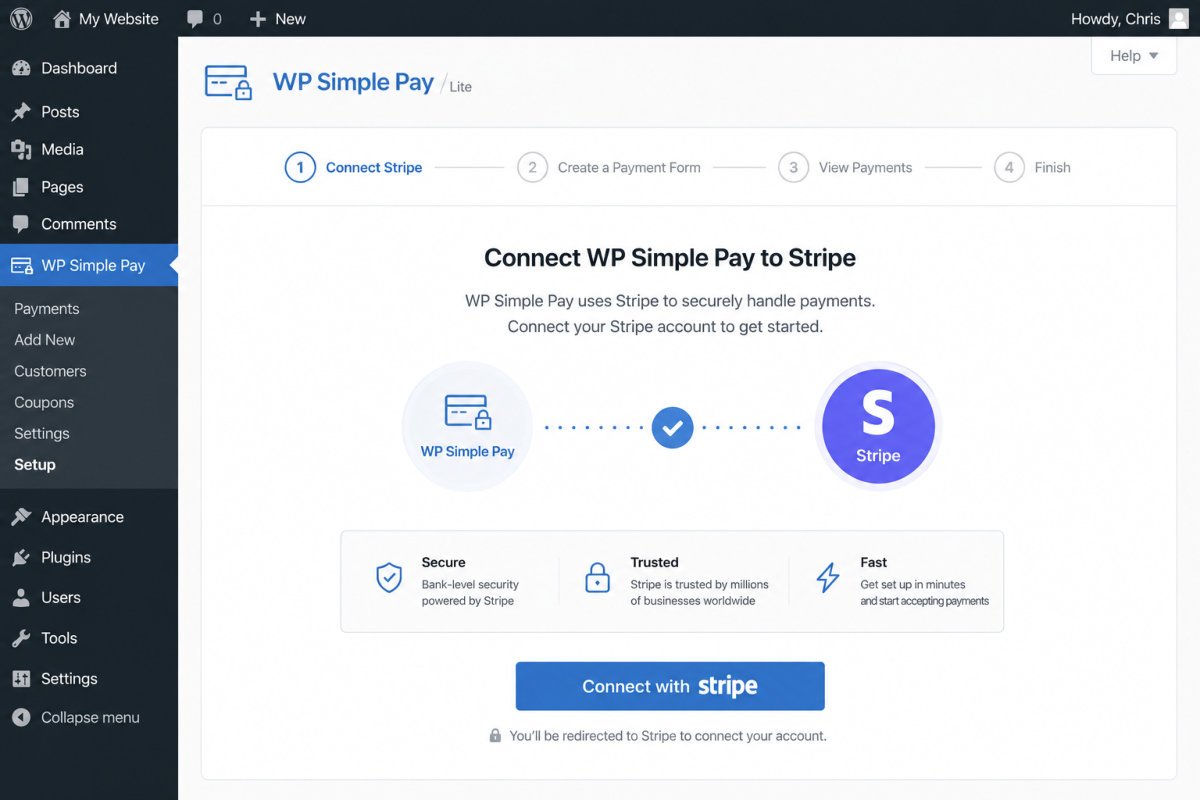
- Go to Plugins → Add New Plugin, search for “WP Simple Pay,” install and activate it.
- Connect your Stripe account through the plugin’s setup wizard.
- Create a new payment form, set the price and product name.
- Copy the generated shortcode or block, and place it on any page.
The free version supports a single payment gateway (typically Stripe), which is genuinely enough for most beginners selling a small number of products.
Method 2: Easy Digital Downloads (Growing Catalog)
Best if you’re building a genuine library of digital products over time, ebooks, software, design assets, music files.
- Go to Plugins → Add New Plugin, search for “Easy Digital Downloads,” install and activate it.
- Run its setup wizard to configure your store basics and payment gateway.
- Add your first product under the plugin’s Downloads section, including the file itself and its price.
- Use the shortcode or block it generates to display products on any page.
Unlike a simple payment button, Easy Digital Downloads is specifically built around delivering files securely and managing a genuine product catalog as it grows.
WebGomu Tip: Start with WP Simple Pay if you’re only selling one or two things right now. It’s genuinely faster to set up, and you can always migrate to Easy Digital Downloads later if your catalog grows, there’s no need to over-build for a scale you’re not at yet.
An Honest Note on File Delivery Security
With a basic payment button approach, anyone who obtains the direct download link, even without paying, could potentially access the file, since a simple button doesn’t necessarily gate the file itself. Easy Digital Downloads handles this more securely, with protected, time-limited download links tied to actual purchases. If file protection is a real priority for you, that’s a meaningful reason to choose Easy Digital Downloads over a simple payment button, even for a small catalog.
Common Mistakes
- Installing WooCommerce out of habit for a digital-only catalog that never needed its inventory and shipping features.
- Using an unprotected payment button for a product where file security genuinely matters.
- Choosing Easy Digital Downloads for just one simple product, when WP Simple Pay would have been faster to set up.
- Forgetting to test the full purchase flow yourself before announcing a product is live.
Recommended Tools
- WP Simple Pay — the fastest path for one or two digital products
- Easy Digital Downloads — purpose-built for a growing digital product catalog with real delivery security
Key Takeaways
- WooCommerce is often unnecessary overhead for digital-only sales.
- WP Simple Pay suits one or two products; Easy Digital Downloads suits a growing catalog.
- A basic payment button doesn’t fully secure file delivery, worth considering if protection matters to you.
- Always test the complete purchase flow before going live.
Frequently Asked Questions
Do I need WooCommerce to sell an ebook or template on WordPress?
No. Tools like WP Simple Pay or Easy Digital Downloads handle digital-only sales without WooCommerce’s added complexity, which is largely built for physical inventory and shipping.
Which is better, WP Simple Pay or Easy Digital Downloads?
WP Simple Pay is faster to set up for one or two products. Easy Digital Downloads is better suited to a growing catalog and offers more secure file delivery built specifically for digital products.
Is it safe to deliver digital files through a simple payment button?
Not fully. A direct download link from a basic payment button can potentially be accessed without payment if the link is shared. Easy Digital Downloads offers more secure, protected delivery if this is a concern.
Can I sell subscriptions or memberships without WooCommerce too?
Yes, dedicated membership plugins handle recurring, gated content access, we cover this specifically in a separate guide.
Do these tools require coding knowledge?
No. Both WP Simple Pay and Easy Digital Downloads are designed for non-technical setup, using guided wizards and shortcodes rather than custom code.
Resources Links
Author:

Christoper Enolpe
Founder of WebGomu • WordPress Freelancer with 10+ Years of Experience
Christoper is the founder of WebGomu and a WordPress freelancer with over 10 years of hands-on experience building, optimizing, and maintaining WordPress websites. He writes practical, beginner-friendly guides based on real-world experience, covering WordPress, SEO, website performance, and AI tools to help readers build better websites with confidence.
Learn more: https://webgomu.com/about/
Get one WordPress tip every week
Start Here

The Ultimate Beginner’s Guide to WordPress (2026): Build Your First Website Without Coding
Popular Guides
Our Partner

More from the blog
How to Sell Online Courses with WordPress (2026)
Membership Sites on WordPress: How to Get Started (2026)