Best Free Alternatives to Elementor Pro (2026)

The best free alternatives to Elementor Pro are native Gutenberg with Full Site Editing, Kadence Blocks, GenerateBlocks with GeneratePress, Spectra, Beaver Builder’s free tier, and Brizy’s free tier. Gutenberg is the simplest no-plugin option; GenerateBlocks and GeneratePress are strong choices for performance-focused sites; Kadence Blocks and Spectra add more design flexibility inside Gutenberg; and Beaver Builder or Brizy are better fits if you want a visual drag-and-drop canvas.
Before You Start
If you have not decided between a page builder and native WordPress blocks, start with my Elementor vs Gutenberg comparison. This guide is for readers who specifically want to avoid Elementor Pro’s recurring subscription cost.
Elementor’s paid plans can cost around $60 per year for an entry-level site, although pricing varies by plan, renewal terms, and the number of sites included. Check the current free-tier limits for each alternative before designing a production site around it.
What You’ll Learn
- Why native Gutenberg might already be the free alternative you need
- How five dedicated free tools compare with Gutenberg
- How editor type, flexibility, portability, and performance differ
- Which option fits a blog, business site, landing page, or performance-focused build
Quick Answer: Which Free Elementor Alternative Is Right for You?
| If you want… | Start with… |
|---|---|
| No extra plugin and the lowest long-term lock-in | Gutenberg with Full Site Editing |
| A lightweight, performance-oriented block setup | GenerateBlocks + GeneratePress |
| More design blocks inside the native editor | Kadence Blocks or Spectra |
| A traditional visual drag-and-drop editor | Beaver Builder or Brizy |
The Free Option Already Built Into WordPress
Before installing a dedicated alternative, remember that Gutenberg with Full Site Editing is free and built into WordPress. With a compatible block theme, you can edit headers, footers, templates, navigation, and page layouts without adding another builder plugin. Read my Gutenberg block editor tutorial for beginners if you have not used patterns, reusable blocks, or the Site Editor yet.
How These Alternatives Were Evaluated
These tools were compared using editor experience, free-tier restrictions, layout flexibility, theme compatibility, content portability, accessibility controls, documentation, and front-end performance considerations.
Performance is not an absolute property of a plugin. Hosting, theme, images, caching, other plugins, and the page itself can change the result. If you test these tools, use the same page layout, images, hosting environment, and caching settings, and test both mobile and desktop results. My WordPress speed guide explains how to establish a baseline.
6 Free Alternatives to Elementor Pro at a Glance
| Tool | Editor type | Free version | Best for | Main limitation |
|---|---|---|---|---|
| Gutenberg | Native WordPress blocks | Yes | Blogs, simple business sites, and low-lock-in builds | Less pixel-level control than a dedicated visual builder |
| Kadence Blocks | Gutenberg extension | Yes | Flexible block layouts inside the native editor | Some advanced features are paid |
| GenerateBlocks + GeneratePress | Minimal Gutenberg setup | Yes | Performance-focused sites | Can require more manual layout work |
| Spectra | Gutenberg extension | Yes | More prebuilt design elements in Gutenberg | Can create a busier editing experience |
| Beaver Builder (free) | Visual drag-and-drop canvas | Yes, with limits | Traditional visual editing | Free-tier modules and templates are limited |
| Brizy (free) | Visual drag-and-drop canvas | Yes, with limits | Elementor-like visual workflow | Confirm features and test performance |
1. Kadence Blocks
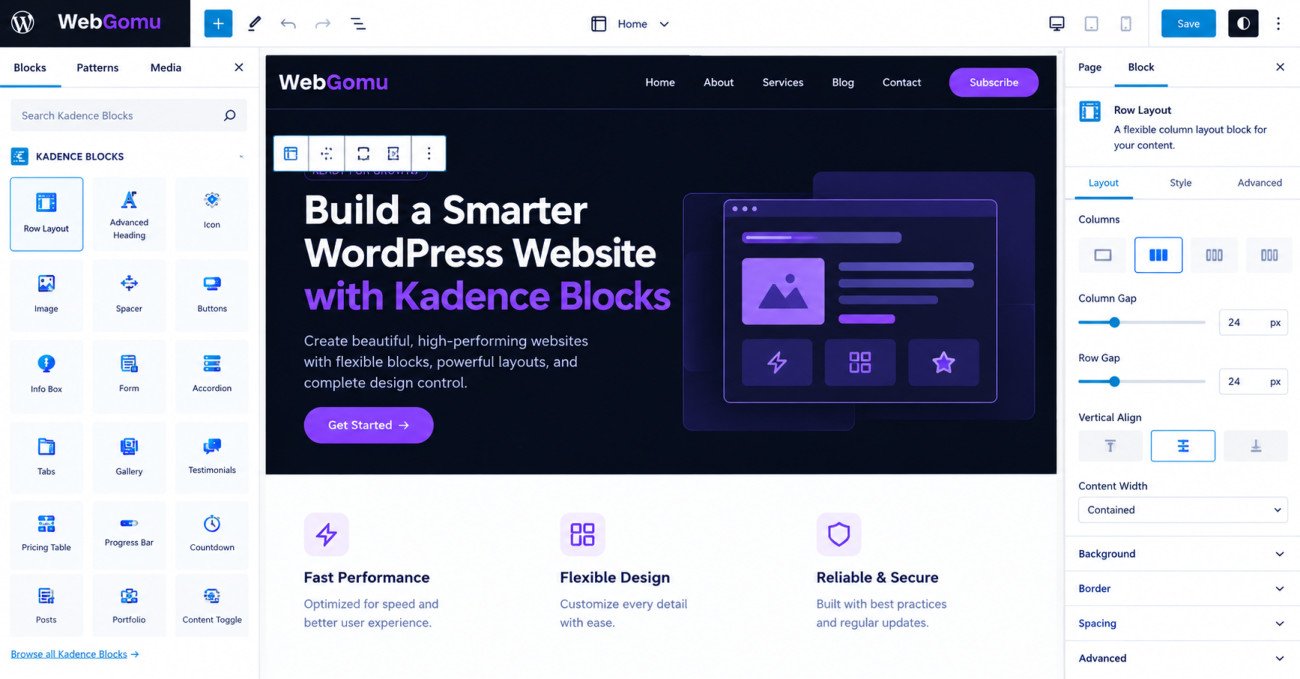
Kadence Blocks works inside Gutenberg and adds more layout and design blocks. It is a useful middle ground for people who want more flexibility than core Gutenberg provides without moving to a completely separate editing interface. Read the full Kadence Blocks review before deciding whether its free blocks cover your project.
Best for: Anyone wanting a more flexible, WordPress-native building experience.
Main trade-off: Some advanced design and dynamic-content features may require a paid upgrade.
2. GenerateBlocks + GeneratePress
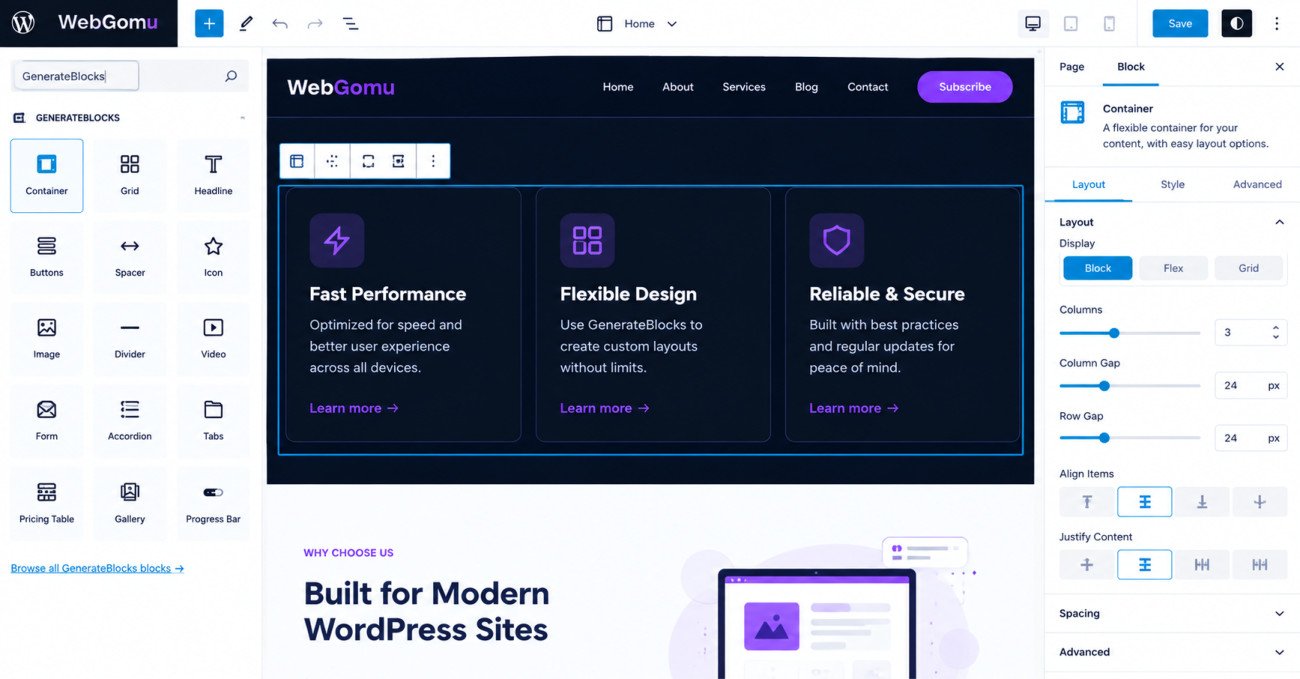
GenerateBlocks paired with GeneratePress is a minimalist Gutenberg setup built around reusable containers, grids, headings, buttons, and other layout elements. It is a strong option when you want to keep the front end lean and are comfortable assembling layouts deliberately.
Best for: Speed-focused site owners who want a controlled, lightweight build.
Main trade-off: It can involve more manual layout work and feel less immediately visual than Elementor, Beaver Builder, or Brizy. See my GenerateBlocks review.
3. Spectra
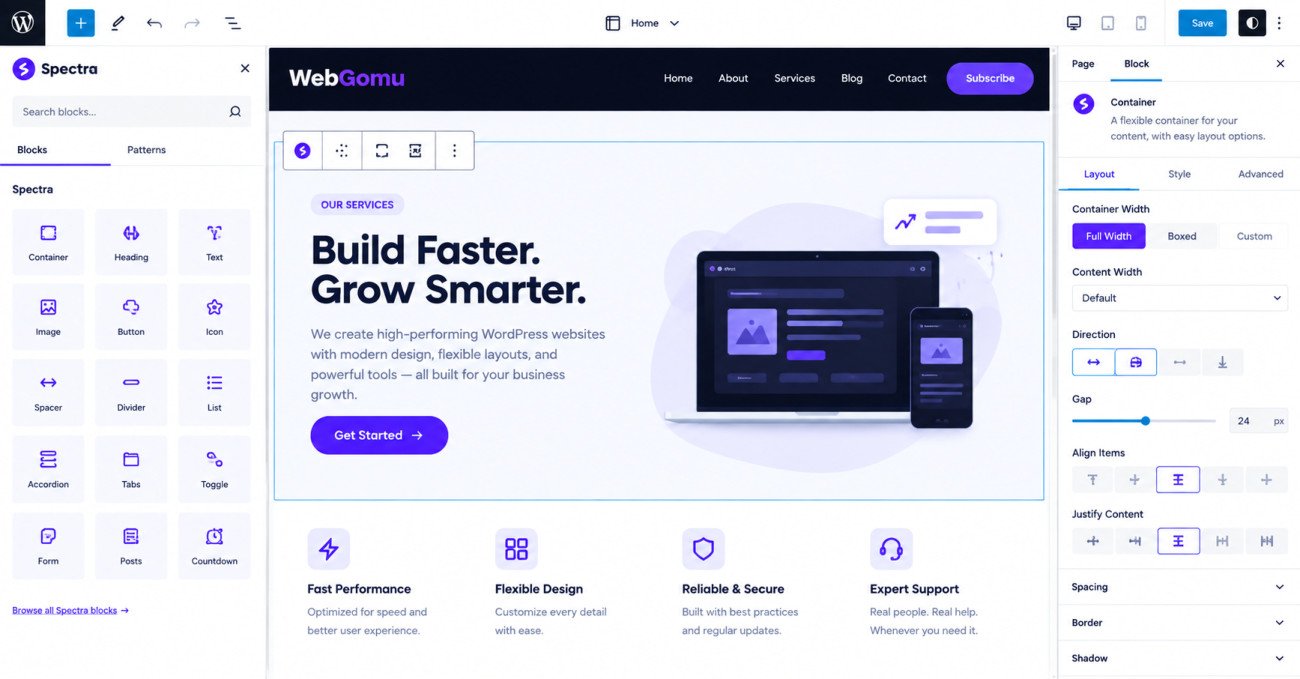
Spectra extends Gutenberg with additional blocks, layout controls, and starter design elements while keeping the editing workflow inside WordPress.
Best for: Readers wanting a broad selection of design blocks in a Gutenberg-based workflow.
Main trade-off: More available blocks can increase interface complexity. Review the Spectra review and install only what you expect to use.
4. Beaver Builder (Free)
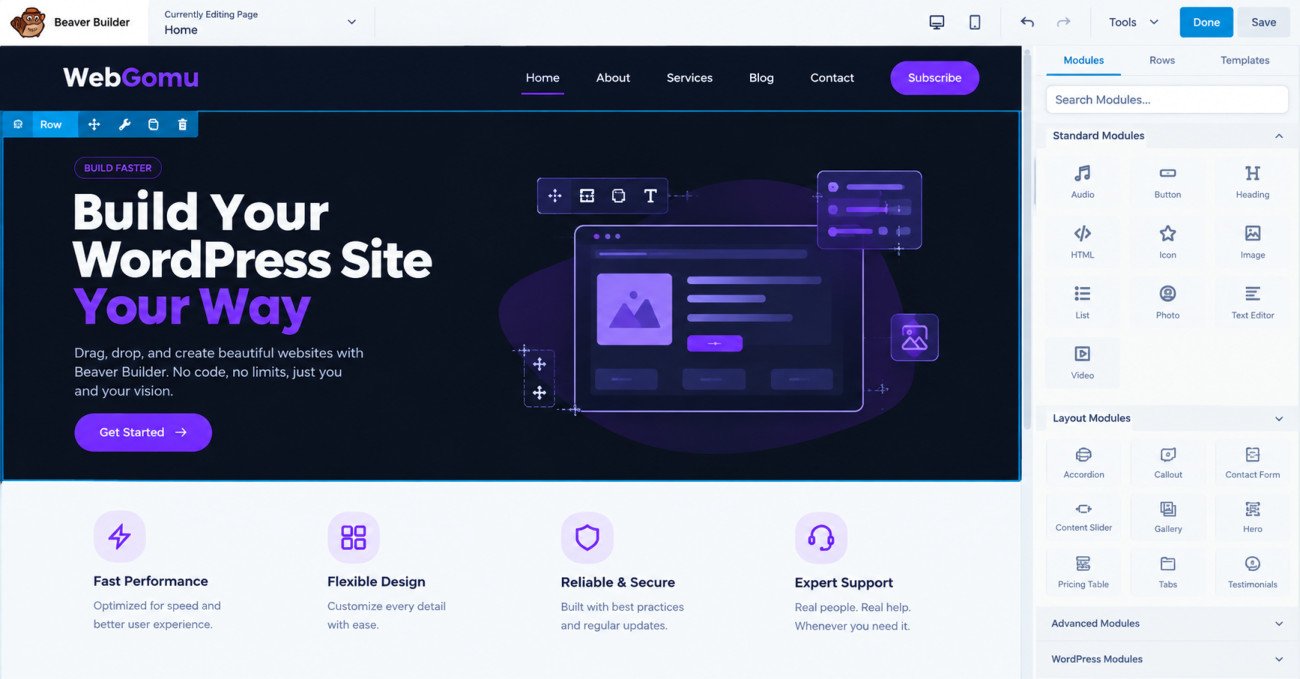
Beaver Builder offers a visual drag-and-drop canvas, making it closer to Elementor’s traditional editing experience than the block-based options above. Its free tier is more limited than the paid version, so check current feature and template restrictions before choosing it for a production site.
Content portability varies by builder, module, theme, and page. Test deactivation on a staging site instead of assuming every page will remain fully editable in Gutenberg.
Best for: Readers who specifically want a visual canvas.
Main trade-off: Confirm that the free tier includes the modules and templates your site needs. Read my Beaver Builder review.
WebGomu Tip: Before committing to any builder, create a backup and test deactivation on a staging copy. Check whether the page remains readable, editable, and free of unwanted builder markup.
5. Brizy (Free)
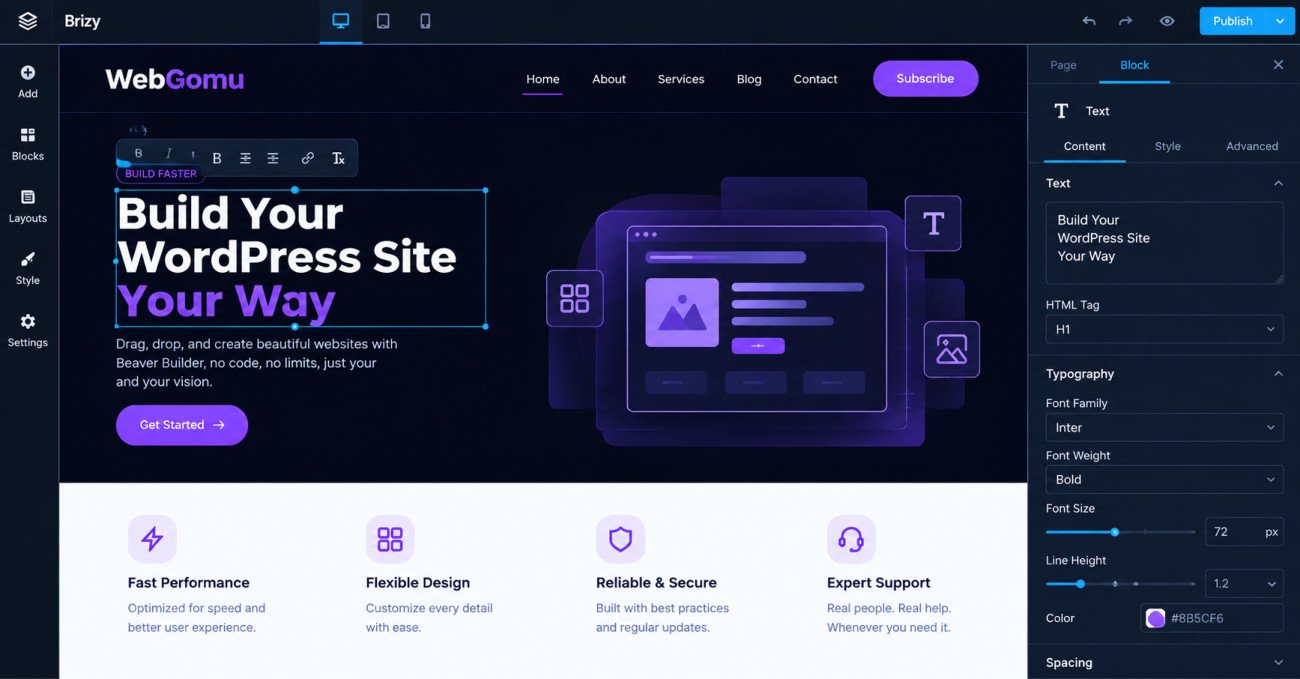
Brizy provides a visual canvas and inline editing workflow that may feel familiar to Elementor users. It is worth considering if you value direct on-page editing and do not want to learn a block-based layout system first.
Best for: Readers wanting an Elementor-like visual workflow without immediately purchasing a Pro plan.
Main trade-off: Confirm free-tier limits and test the finished pages on your own hosting stack. See my Brizy review.
Which One Should You Choose?
- Want the simplest, lowest-lock-in option: Start with native Gutenberg and Full Site Editing.
- Want more design flexibility inside Gutenberg: Try Kadence Blocks or Spectra.
- Performance is your main priority: Consider GenerateBlocks with GeneratePress, then verify the result with your own tests.
- Want a traditional visual canvas: Compare Beaver Builder and Brizy, paying attention to current free-tier limits.
Performance, Portability, and Free-Tier Checks
Do not choose a builder solely because it is advertised as fast. Measure the same page before and after installation, and compare mobile and desktop results. A lightweight builder cannot compensate for slow hosting, oversized images, excessive plugins, or poorly configured caching. See how to speed up a slow WordPress website.
Also check what happens if you deactivate the plugin. “Content remains visible” is not the same as “content remains editable in Gutenberg.” Create a backup and test a representative page on a staging site before switching.
Common Mistakes
- Assuming you need a dedicated builder when Gutenberg already covers the project.
- Choosing a tool based only on a speed claim without testing your own site.
- Ignoring free-tier limits until after designing around a paid feature.
- Not checking whether content remains readable and editable after deactivation.
- Installing several block libraries or page builders at once.
- Switching builders repeatedly instead of learning one workflow.
Key Takeaways
- Gutenberg with Full Site Editing may be enough for many blogs and simple business sites.
- Kadence Blocks and Spectra add design flexibility while keeping users inside Gutenberg.
- GenerateBlocks plus GeneratePress is performance-oriented, but the full site setup determines the result.
- Beaver Builder and Brizy are better fits for users who specifically want a visual canvas.
- Check current free-tier limits and test portability before building a production site around any builder.
Frequently Asked Questions
Is there a genuinely free alternative to Elementor Pro?
Yes. Gutenberg with Full Site Editing is built into WordPress. Kadence Blocks, Spectra, GenerateBlocks, Beaver Builder, and Brizy also have free options, although available blocks, templates, and advanced features vary.
Do I need a page builder plugin at all in 2026?
Not necessarily. Gutenberg and Full Site Editing can handle many blogs, portfolios, and straightforward business sites. A separate builder is more useful when you need a particular visual workflow or advanced controls.
Which free Elementor alternative is fastest?
There is no universal fastest option because hosting, theme, images, caching, and page design affect the result. GenerateBlocks with GeneratePress is a strong performance-oriented starting point, but test the finished page on your own site.
What happens to my content if I deactivate a page builder plugin?
It depends on the builder, modules, theme, and page. A page may remain visible but no longer be easily editable in Gutenberg, or it may contain builder-specific markup. Test deactivation on a staging copy.
Is Kadence Blocks a good replacement for Elementor?
For many sites, yes. It keeps editing inside Gutenberg and adds layout and design blocks. It is not a one-to-one replacement for every Elementor Pro feature, so compare the specific features your project requires.
Resources and Related Guides
- The Ultimate Beginner’s Guide to WordPress (2026) — Start here if you are building your first WordPress site.
- Elementor vs Gutenberg: Which Page Builder Should You Use? — Compare the two core approaches.
- Gutenberg Block Editor Tutorial for Beginners — Learn blocks, patterns, and the Site Editor.
- How to Choose the Right WordPress Theme for Beginners — Choose a compatible theme.
- How to Speed Up a Slow WordPress Website — Establish a baseline and test your pages.
- Best WordPress Plugins Every Beginner Needs — Avoid overlapping plugins.
Author:

Christoper Enolpe
Founder of WebGomu • WordPress Freelancer with 10+ Years of Experience
Christoper is the founder of WebGomu and a WordPress freelancer with over 10 years of hands-on experience building, optimizing, and maintaining WordPress websites. He writes practical, beginner-friendly guides based on real-world experience, covering WordPress, SEO, website performance, and AI tools to help readers build better websites with confidence.
Learn more: https://webgomu.com/about/
Get one WordPress tip every week
Start Here

The Ultimate Beginner’s Guide to WordPress (2026): Build Your First Website Without Coding
Popular Guides
Our Partner

More from the blog

WPCode Review 2026: The Safe Way to Add Custom Code

AI Photo Editing Tools for WooCommerce Product Photos (2026)