Beaver Builder Review 2026: Stable, But Slower to Innovate

As featured in: Best Free Alternatives to Elementor Pro.
Beaver Builder is one of the most established WordPress page builders, and its reputation for stability is genuinely earned, clean code, strong backward compatibility, and a track record agencies trust for long-term client sites. Unlike most software we’ve reviewed, its paid tier actually includes a 40% discount on license renewal, the opposite of the renewal price traps we’ve flagged across nearly every hosting and plugin review on this site. The honest trade-offs: the free Lite version is genuinely limited, mainly useful for testing the interface, and Beaver Builder updates and adds new features more slowly than faster-moving competitors like Elementor.
Before You Start
If you’re deciding between a visual drag-and-drop builder and native block-based tools generally, see our Elementor vs Gutenberg comparison first, this review assumes you’re evaluating Beaver Builder specifically.
Beaver Builder doesn’t chase trends. While competitors ship flashy new features on a near-weekly basis, Beaver Builder has built its reputation on the opposite approach: stability, clean output, and predictable long-term maintenance. That’s a real, deliberate trade-off worth understanding clearly.
What You’ll Learn
- What genuinely stands out about Beaver Builder’s stability and code quality
- A rare pricing positive that contrasts with most software renewal patterns
- The real limitations of the free version and the interface’s learning curve
- A common, costly mistake worth avoiding entirely
What’s Genuinely Excellent
- Rock-solid stability and backward compatibility. Multiple independent reviews specifically praise how well older Beaver Builder sites continue working through WordPress core updates, genuinely valuable for long-term client maintenance.
- Clean, WordPress-standard code, contributing to solid out-of-the-box performance compared to heavier competitors.
- Unlimited websites even on the entry paid tier, a genuine value advantage over per-site pricing models common elsewhere.
- Beaver Themer extension goes beyond individual page design, letting you build custom header, footer, single-post, and archive templates, real flexibility beyond what a typical page builder covers.
- Consistently praised documentation and responsive support, cited repeatedly as a reason agencies stick with it long-term.
A Rare Positive: A Genuine Renewal Discount
Worth calling out directly, since it’s the opposite of nearly everything we’ve found reviewing hosting and plugins elsewhere: Beaver Builder’s Standard tier includes a 40% discount specifically on license renewal. That’s genuinely uncommon, most software we’ve reviewed does the reverse, low intro pricing followed by a steep renewal jump. If long-term cost predictability matters to you, this is a real, concrete point in Beaver Builder’s favor.
What Real Users Flag as Frustrating
- The free Lite version is genuinely limited. Unlike some competitors’ more substantial free tiers, Beaver Builder’s free version mainly serves as a way to test the interface, not a fully functional starting point.
- Slower feature and update cadence. Reviewers consistently note Beaver Builder doesn’t chase new features the way competitors like Elementor do, a deliberate trade-off for stability, but a real one if you want cutting-edge design capabilities.
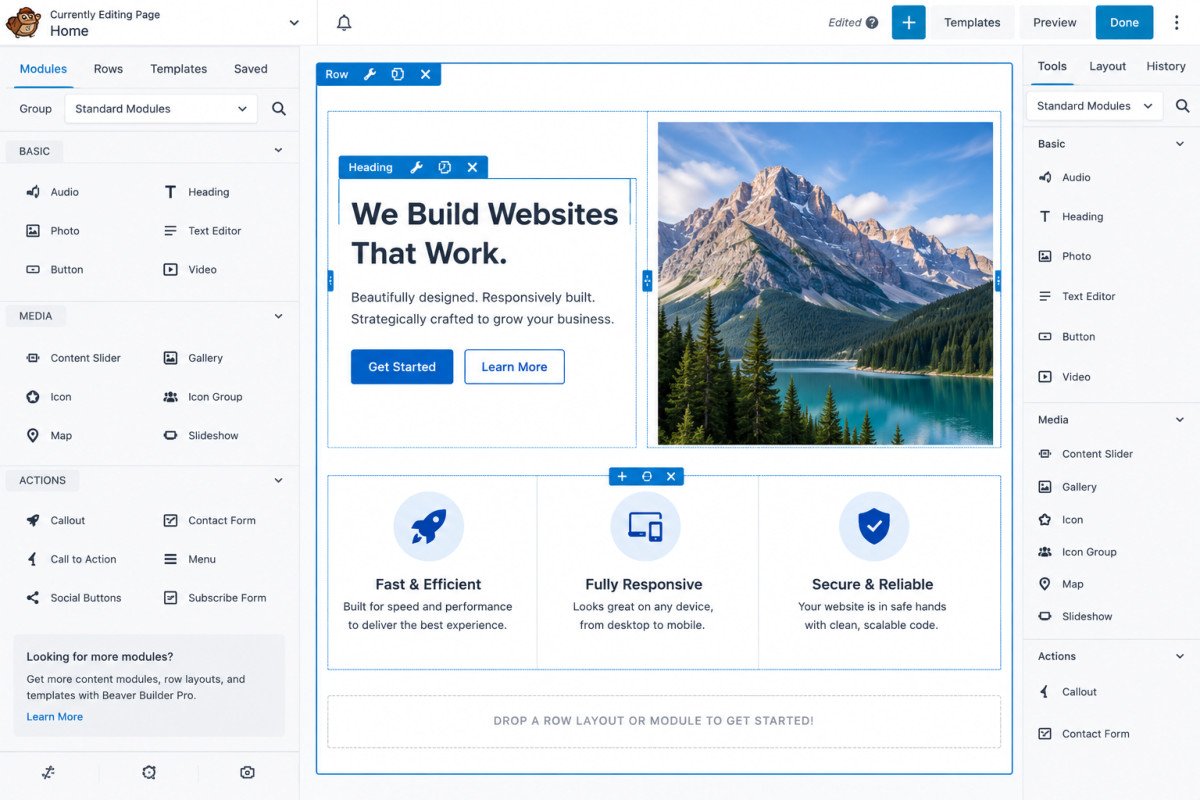
- A genuine learning curve with rows and columns. Multiple reviewers describe the layering system as less intuitive than expected at first, occasionally requiring a layout restart if columns aren’t structured carefully from the start.
WebGomu Tip: Don’t install Beaver Builder alongside Elementor or Gutenberg-heavy block plugins hoping to combine the best of each. Multiple reviewers specifically flag this as a fast track to CSS conflicts and painful client handoffs. Pick one builder for your key templates and standardize on it.
Who Should Use Beaver Builder
Agencies and freelancers building long-term client sites where stability and predictable maintenance matter more than chasing the newest design trend. The renewal discount and Beaver Themer’s template flexibility make it a genuinely strong long-term investment for repeat client work.
Who Might Want to Look Elsewhere
If you want the newest design features and a faster-moving development cycle, Elementor remains the more actively evolving option, covered in our comparison. If performance is your single top priority, GenerateBlocks (see our dedicated review) is worth comparing directly.
Common Mistakes
- Running Beaver Builder alongside another page builder or heavy block plugin on the same site, risking real CSS conflicts.
- Expecting the free Lite version to be a fully functional starting point rather than an interface preview.
- Not planning row and column structure carefully upfront, leading to rebuilding layouts partway through.
- Choosing Beaver Builder specifically for the newest design trends, its strength is stability, not feature velocity.
Key Takeaways
- Beaver Builder’s reputation for stability and clean code is genuinely earned, particularly valued by agencies for long-term client sites.
- Its 40% renewal discount is a rare, genuine positive compared to the steep renewal jumps common elsewhere.
- The free version is limited to an interface preview, not a fully functional free tier.
- Avoid mixing Beaver Builder with other page builders on the same site to prevent CSS conflicts.
Frequently Asked Questions
Is Beaver Builder’s free version good enough to build a full site?
Not really, the free Lite version is genuinely limited and mainly useful for testing the interface rather than building a complete site.
Does Beaver Builder’s price increase at renewal?
No, unusually, the Standard tier includes a 40% discount specifically on renewal, the opposite of the steep renewal jumps common with most hosting and software.
Can I use Beaver Builder alongside Elementor on the same site?
It’s not recommended. Multiple reviewers specifically flag this combination as a common cause of CSS conflicts and layout glitches.
Does Beaver Builder update as frequently as Elementor?
No, it takes a deliberately slower, more stable approach to updates and new features, a genuine trade-off compared to faster-moving competitors.
What is Beaver Themer?
An extension that extends Beaver Builder beyond individual page design, letting you build custom header, footer, single-post, and archive templates for your entire theme.
Resources Links
- The Ultimate Beginner’s Guide to WordPress (2026)
- Best Free Alternatives to Elementor Pro
- Elementor vs Gutenberg: Which Page Builder Should You Use?
- GenerateBlocks Review 2026
Learn more directly from the source: Visit Beaver Builder’s official website for current pricing and full feature details.
Author:

Christoper Enolpe
Founder of WebGomu • WordPress Freelancer with 10+ Years of Experience
Christoper is the founder of WebGomu and a WordPress freelancer with over 10 years of hands-on experience building, optimizing, and maintaining WordPress websites. He writes practical, beginner-friendly guides based on real-world experience, covering WordPress, SEO, website performance, and AI tools to help readers build better websites with confidence.
Learn more: https://webgomu.com/about/
Get one WordPress tip every week
Start Here

The Ultimate Beginner’s Guide to WordPress (2026): Build Your First Website Without Coding
Popular Guides
Our Partner

More from the blog

WPCode Review 2026: The Safe Way to Add Custom Code

AI Photo Editing Tools for WooCommerce Product Photos (2026)