AI Photo Editing Tools for WooCommerce Product Photos (2026)


Stores using professional-looking product images see conversion rates up to 30% higher than those relying on amateur photos, but traditional product photography runs $20-150+ per image. AI photo editing tools close that gap for a fraction of the cost, $0.03-2.99 per image typically, handling background removal, lifestyle scene generation, and batch editing in seconds instead of the 15-30 minutes manual editing takes per image. For WooCommerce specifically, Remove.bg offers a genuine, dedicated plugin for direct integration, while broader creative platforms like Phot.AI offer deeper editing capability without native WooCommerce integration, worth knowing which trade-off fits your actual workflow.
Before You Start
See our WooCommerce setup guide if you haven’t set up your store yet, this article assumes you’re already selling and specifically looking to improve product imagery.
There’s a specific, familiar kind of dread in photographing your own products with a phone propped against a stack of books, knowing the lighting is wrong and the background is your actual kitchen counter. AI photo editing exists specifically to close that gap between “photo I actually took” and “photo that looks like it belongs in a real store.”
What You’ll Learn
- Why product photo quality genuinely affects conversion, not just aesthetics
- The real cost comparison between traditional and AI-assisted photography
- How the leading tools actually compare for WooCommerce specifically
- An honest look at Phot.AI, including what it does well and where it doesn’t fit
Why Product Photos Matter More Than You Think
This isn’t just a design preference, stores using professional-quality product images see conversion rates up to 30% higher than those using amateur photography, according to research cited across multiple ecommerce sources. For a small WooCommerce store, that’s a genuinely meaningful difference in real revenue, not a marginal polish.
The Real Cost Comparison
Traditional product photography runs $20 to $150 or more per image depending on complexity, a real barrier for stores with dozens or hundreds of SKUs. AI-powered editing tools range from roughly $0.03 to $2.99 per image, an 80-95% cost reduction for most catalogs. Manual background removal in something like Photoshop also takes 15-30 minutes per image for a skilled editor, AI tools handle the same task in seconds.
What These Tools Actually Do
- Background removal, isolating your product from its original background cleanly
- Lifestyle scene generation, placing your product into a realistic, styled setting without a physical photoshoot
- Batch processing, applying consistent edits across dozens or hundreds of images at once
- Upscaling and enhancement, improving image quality from a basic phone photo
Comparing the Options
| Tool | Best For | WooCommerce Integration |
|---|---|---|
| Remove.bg | Direct, plugin-based workflow | Dedicated WooCommerce plugin available |
| Phot.AI | Broader creative editing beyond just background removal | No native plugin, web-based workflow |
| Photoroom | Mobile-first editing, marketplace templates | No native WooCommerce plugin |
| Pebblely | Quick, template-based lifestyle backgrounds | No native WooCommerce plugin |
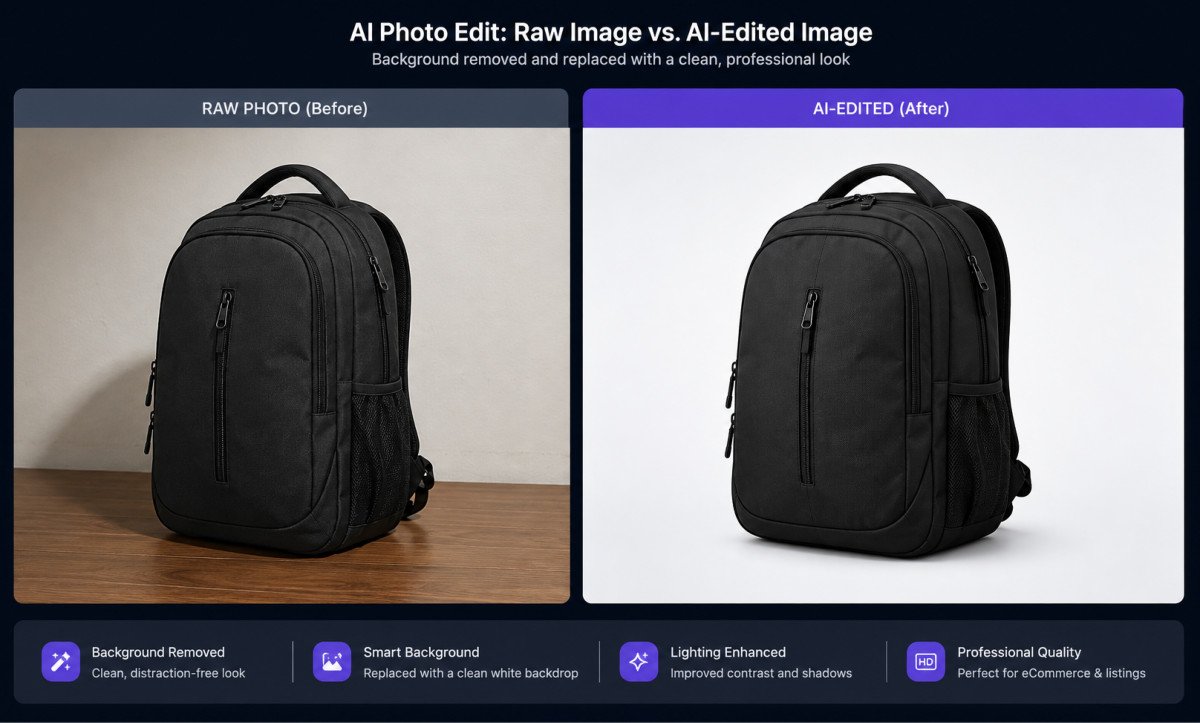
A Closer Look at Phot.AI
Rating Breakdown
Based on independent testing data, verified user reviews, and official documentation, not first-hand lab testing on our end.
| Category | Score | Why |
|---|---|---|
| Features | 4.5 / 5 | Genuinely broad toolset, background replacement, AI avatars, text-to-image, object removal, photo restoration |
| Ease of Use | 4.2 / 5 | Drag-and-drop editor with real-time editing, accessible without design experience |
| WooCommerce Fit | 3.3 / 5 | No dedicated plugin, requires exporting and manually uploading edited images |
| Value for Money | 4.0 / 5 | Competitive per-image and subscription pricing for the breadth of features included |
| Support | 3.5 / 5 | Email/help desk support only, no live chat |
Overall: 3.9 / 5 — A genuinely capable, broad AI photo editing suite, best suited to store owners comfortable with a manual export-and-upload workflow rather than a native plugin integration.
Phot.AI is a general-purpose AI photo editing and creative platform covering background removal, AI avatars, text-to-image generation, object removal, and photo restoration, genuinely more editing depth than a single-purpose background remover. For WooCommerce specifically, there’s an honest trade-off worth knowing: it doesn’t offer a dedicated WordPress or WooCommerce plugin, so your workflow involves editing images on Phot.AI’s platform, then exporting and uploading them into your product listings manually, functional, but a real extra step compared to a native plugin.
The Honest Distinction: Native Plugin vs. General Tool
This is worth being direct about when choosing between these options. If your priority is the smoothest possible workflow directly inside WordPress, a tool with an actual WooCommerce plugin, like Remove.bg, genuinely saves real time across a large catalog. If your priority is broader creative capability, lifestyle scenes, object removal, restoration, beyond just clean background removal, a platform like Phot.AI offers more depth, at the cost of a manual export step.
WebGomu Tip: If you’re processing a large catalog regularly, workflow integration matters more than raw feature depth, the time saved by a native plugin compounds across hundreds of images. If you’re doing occasional, more creative editing for a smaller number of hero product shots, a broader tool’s extra capability is worth the manual export step.
Sources & Methodology
This article draws on published third-party research and vendor documentation rather than first-hand lab testing. Specific claims and their sources:
- “Up to 30% higher conversion” from professional product images: Cited via Justuno research, referenced in Rewarx, “Top 10 Best AI Background Removal Tools for Ecommerce 2026” (accessed August 2026).
- Traditional photography cost ($20-150+/image) and AI tool cost ($0.03-2.99/image): WearView, “8 Best AI Product Photography Tools for Ecommerce in 2026” (accessed August 2026).
- Manual background removal time (15-30 minutes/image): Rewarx, “Top 10 Best AI Background Removal Tools for Ecommerce 2026” (accessed August 2026).
- Remove.bg’s dedicated WooCommerce plugin: Confirmed via Rewarx, “Top 10 Best AI Background Removal Tools for Ecommerce 2026”, which states Remove.bg “offers dedicated plugins for Shopify, WooCommerce, and major e-commerce platforms” (accessed August 2026).
- Phot.AI’s feature set (background replacement, AI avatars, text-to-image, object remover, photo restoration): GetApp, Phot.AI product listing, and Capterra, Phot.AI product listing (both accessed August 2026).
- Rating Breakdown scores: Editorial judgment based on the vendor documentation and third-party listings above, not first-hand testing. The “WooCommerce Fit” score specifically reflects the absence of a native plugin, confirmed by checking Phot.AI’s own site and the WordPress.org plugin directory for a listing, none found as of this article’s publication.
Common Mistakes
- Choosing a tool based on feature breadth alone without considering your actual catalog size and workflow.
- Assuming every AI photo tool has native WooCommerce integration, several genuinely don’t.
- Skipping consistent editing across your catalog, inconsistent backgrounds and lighting look unprofessional even with individually good photos.
- Not testing a tool’s output on your specific product type, fashion, jewelry, and electronics all have genuinely different editing challenges.
Key Takeaways
- Professional-quality product images are linked to meaningfully higher conversion rates, a real business impact, not just aesthetics.
- AI photo editing tools cost a fraction of traditional photography, often 80-95% less per image.
- Remove.bg offers genuine native WooCommerce plugin integration; Phot.AI offers broader editing depth with a manual export step instead.
- Choose based on your actual catalog size and workflow needs, not feature count alone.
Frequently Asked Questions
Do product photos actually affect WooCommerce store conversions?
Yes, stores using professional-quality product images see conversion rates up to 30% higher than those relying on amateur photography, according to ecommerce research.
Is AI photo editing actually cheaper than traditional product photography?
Significantly, traditional photography runs $20-150+ per image, while AI tools typically cost $0.03-2.99 per image, an 80-95% cost reduction for most catalogs.
Does Phot.AI have a WooCommerce plugin?
No, Phot.AI doesn’t offer a native WordPress or WooCommerce plugin. Images are edited on its platform and then exported and uploaded to product listings manually.
Which AI photo tool has native WooCommerce integration?
Remove.bg offers a dedicated plugin for direct WooCommerce integration, a genuine workflow advantage for stores processing large catalogs regularly.
What can AI photo editing tools actually do for product images?
Background removal, lifestyle scene generation, batch processing across many images at once, and image upscaling or enhancement from basic source photos.
Resources Links
- The Ultimate Beginner’s Guide to WordPress (2026)
- How to Start an Online Store with WooCommerce
- WordPress Image Optimization: The Complete Guide
- Best WooCommerce Plugins for a New Store
- WooCommerce Checkout Optimization: Reduce Cart Abandonment
Learn more directly from the source: Visit Phot.AI’s official website for current pricing and full feature details.
Author:

Christoper Enolpe
Founder of WebGomu • WordPress Freelancer with 10+ Years of Experience
Christoper is the founder of WebGomu and a WordPress freelancer with over 10 years of hands-on experience building, optimizing, and maintaining WordPress websites. He writes practical, beginner-friendly guides based on real-world experience, covering WordPress, SEO, website performance, and AI tools to help readers build better websites with confidence.
Learn more: https://webgomu.com/about/
Get one WordPress tip every week
Start Here

The Ultimate Beginner’s Guide to WordPress (2026): Build Your First Website Without Coding
Popular Guides
Our Partner

More from the blog

Best AI Content Generators for WordPress: A Comparative Review

AI for WordPress: The Complete 2026 Guide