Spectra Review 2026: The Gutenberg-Native Builder, Honestly

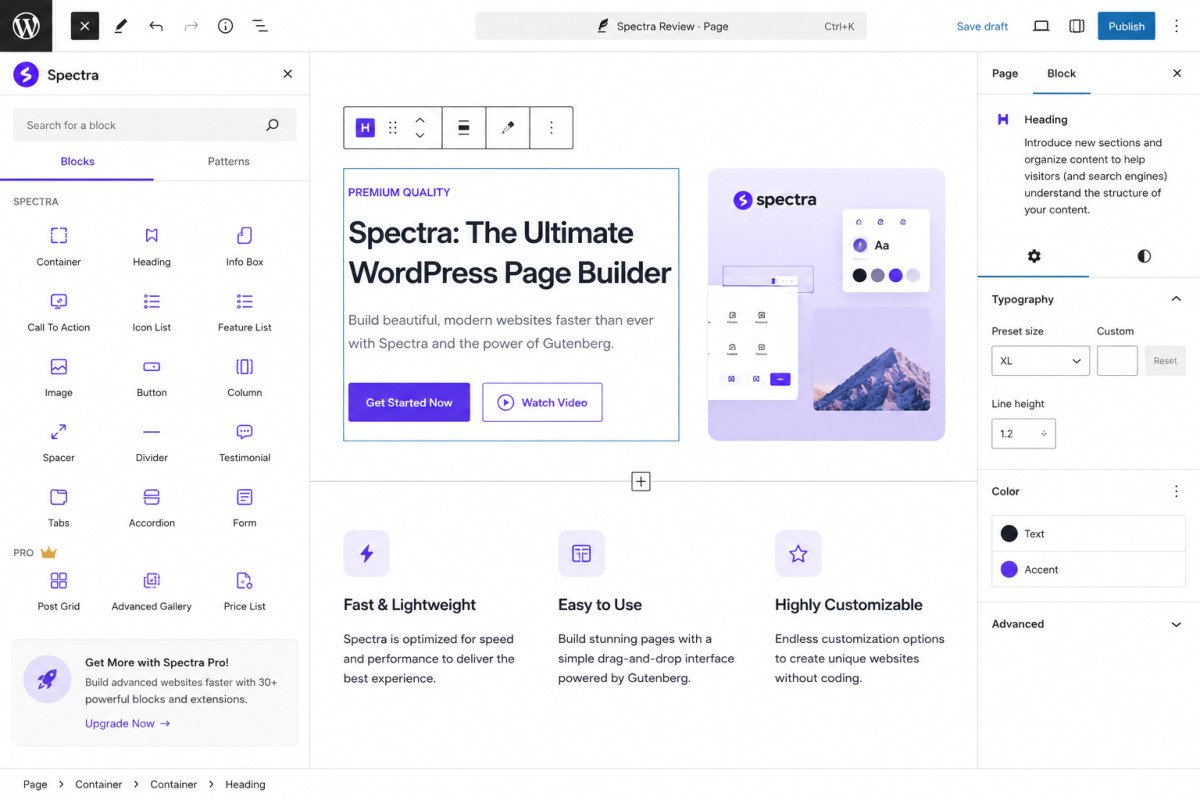
Spectra, formerly Ultimate Addons for Gutenberg, upgrades the native block editor rather than replacing it with a separate environment the way Elementor does. Built by Brainstorm Force, the team behind the Astra theme, it’s genuinely lightweight, one detailed comparison measured roughly 42KB of CSS versus 180KB or more for Elementor on an equivalent page. The free tier is substantial, but it has a real, specific gap: it lacks dynamic data support, meaning content that needs to populate automatically (like a portfolio grid pulling from custom fields) isn’t well covered. You’ll likely also need a separate form plugin like WPForms, Spectra doesn’t include built-in lead capture.
Before You Start
If you’re deciding between a page builder and native block-based tools generally, see our Elementor vs Gutenberg comparison first, this review assumes you’re evaluating Spectra specifically.
Spectra shows up constantly in “best free Elementor alternative” discussions, and the performance case is genuinely strong. But a few specific limitations are worth knowing clearly before you commit, rather than discovering them mid-build.
What You’ll Learn
- What genuinely stands out about Spectra’s performance and native integration
- A real, specific content limitation worth knowing before you build
- What you’ll likely need to pair it with for a complete setup
- How pricing actually compares to alternatives
What’s Genuinely Excellent
- Genuinely strong performance. One detailed comparison measured Spectra’s page weight at roughly 42KB of CSS, against 180KB or more for an equivalent Elementor page, a real, concrete difference, not just a marketing claim.
- Works inside the native block editor, rather than creating a separate editing environment the way Elementor and Divi do, updates and maintenance stay predictable since you’re not managing a second interface layered on top of WordPress.
- A substantial free tier. Over 30 blocks, starter templates, and core design controls, genuinely enough for most bloggers and small business sites without needing to upgrade.
- Reads theme.json global styles automatically, colors and fonts from your active theme carry into Spectra blocks without extra setup, particularly smooth when paired with Astra or another block theme.
- 1 million+ active installations and over 1,500 five-star WordPress.org reviews, a genuine trust signal at this scale.
What Real Users Flag as Frustrating
- Lacks dynamic data support. This is a specific, genuine limitation, content that needs to populate blocks dynamically (like custom field data in a portfolio or listing layout) isn’t well covered, worth knowing if your project needs this kind of functionality.
- Template quality is described as mixed. Not every pre-built template matches the overall polish of the plugin itself.
- No built-in lead capture. Marketing-focused reviews specifically note you’ll need a separate form plugin like WPForms (see our dedicated review) for actual form functionality, Spectra’s blocks cover layout and design, not form submission itself.
WebGomu Tip: If your project needs dynamic content display (like an automatically populating product or portfolio grid), test this specific requirement on a staging site before committing, this is Spectra’s clearest functional gap, and it’s better to confirm early than discover it mid-build.
A Note on Pricing
Reported pricing for Spectra Pro varies across sources, roughly $49 to $69 per year depending on the source and specific plan tier, with lifetime options starting around $319. Bundles combining Spectra Pro with other Brainstorm Force products (like Astra Pro) are also available. Given the variation, confirm current pricing directly on Spectra’s own site before comparing it against GenerateBlocks Pro or Elementor Pro.
Who Should Use Spectra
Bloggers, small business owners, and marketers building landing pages who want strong design flexibility without leaving the native block editor, and who don’t mind pairing it with a separate form plugin for lead capture.
Who Might Want to Look Elsewhere
If dynamic, automatically populated content is central to your project, this is a genuine gap worth testing before committing. For pure performance priority instead, GenerateBlocks (see our dedicated review) is worth comparing directly.
Common Mistakes
- Assuming Spectra includes built-in form functionality, it doesn’t, pair it with WPForms or a similar plugin.
- Building a project requiring dynamic data display without first testing whether Spectra genuinely supports it.
- Comparing pricing based on a single source without checking Spectra’s own site directly, given the reported variation.
- Assuming every pre-built template matches the plugin’s overall design polish, quality varies across the template library.
Key Takeaways
- Spectra delivers genuinely strong, measurable performance compared to heavier page builders.
- Working inside the native block editor keeps maintenance predictable, no separate editing environment to manage.
- Dynamic content support is a real, specific gap worth testing before building around it.
- Plan to pair Spectra with a separate form plugin like WPForms for lead capture.
Frequently Asked Questions
Does Spectra replace the WordPress block editor?
No, it upgrades the native Gutenberg editor with additional blocks and design controls, rather than replacing it with a separate editing environment.
Does Spectra include a contact form builder?
No, it focuses on layout and design blocks. A separate form plugin like WPForms is needed for actual form functionality.
Can Spectra display dynamic content like custom fields?
This is a genuine limitation, verified reviews note it lacks strong dynamic data support, worth testing directly if your project depends on this kind of functionality.
Is Spectra’s free version good enough for a small business site?
Yes, for most standard layouts. The free tier includes over 30 blocks and starter templates, genuinely sufficient for many bloggers and small businesses.
How much does Spectra Pro cost?
Reported pricing varies across sources, roughly $49 to $69 per year, with lifetime options starting around $319. Confirming current pricing directly on Spectra’s site is the most reliable approach.
Resources Links
- The Ultimate Beginner’s Guide to WordPress (2026)
- Best Free Alternatives to Elementor Pro
- GenerateBlocks Review 2026
- WPForms Review 2026
Learn more directly from the source: Visit Spectra’s official website for current pricing and full feature details.
Author:

Christoper Enolpe
Founder of WebGomu • WordPress Freelancer with 10+ Years of Experience
Christoper is the founder of WebGomu and a WordPress freelancer with over 10 years of hands-on experience building, optimizing, and maintaining WordPress websites. He writes practical, beginner-friendly guides based on real-world experience, covering WordPress, SEO, website performance, and AI tools to help readers build better websites with confidence.
Learn more: https://webgomu.com/about/
Get one WordPress tip every week
Start Here

The Ultimate Beginner’s Guide to WordPress (2026): Build Your First Website Without Coding
Popular Guides
Our Partner

More from the blog

WPCode Review 2026: The Safe Way to Add Custom Code

AI Photo Editing Tools for WooCommerce Product Photos (2026)