WPForms Review 2026: Is It Worth the Price?

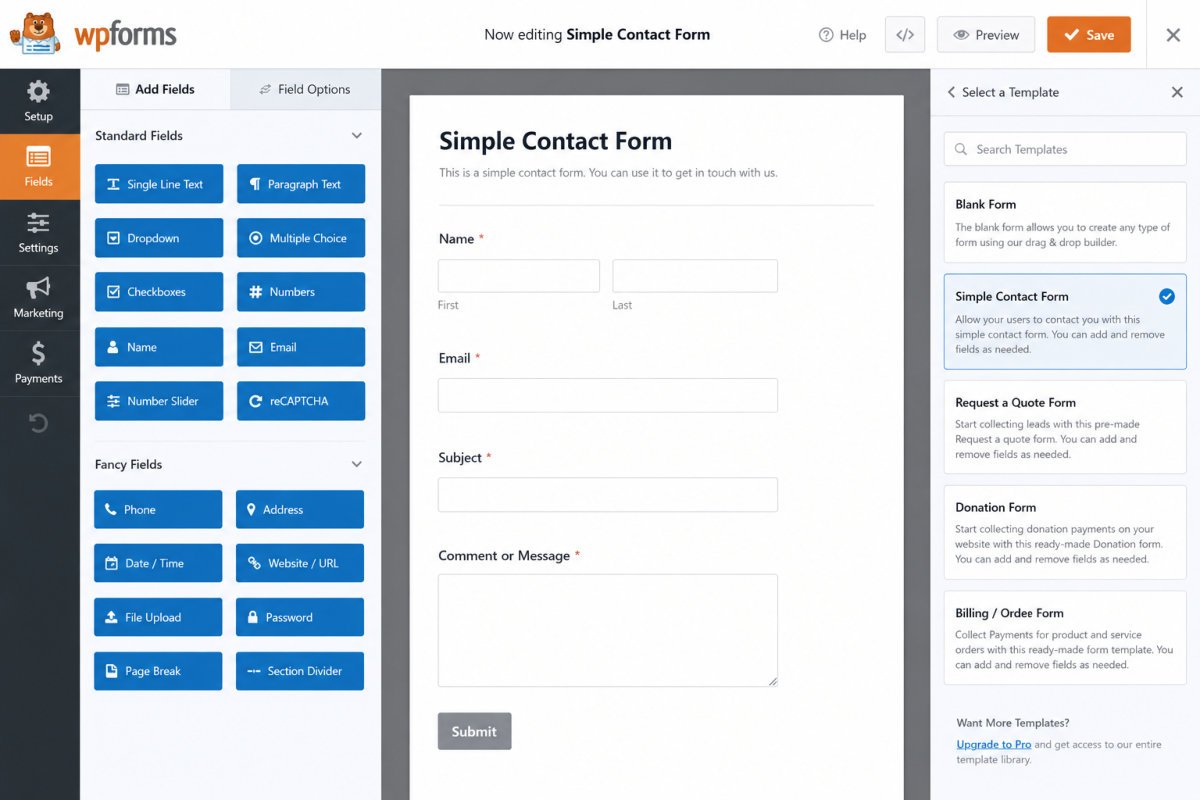
WPForms is a lightweight, genuinely beginner-friendly drag-and-drop form builder, and WebGomu uses it for its own contact form setup. Verified users consistently praise its speed and ease of use, but just as consistently flag two real limitations: pricing that runs higher than several competitors, and a Lite (free) version that’s missing key functionality like the full Entries tool and complete SMTP email logs. For a simple contact form, the free version remains genuinely solid. For anything more advanced, budget for a paid tier and check the renewal price first.
Before You Start
If you’re looking for setup instructions rather than a verdict, see our contact form setup guide instead, this review assumes you’re deciding whether WPForms is the right plugin to install in the first place.
WPForms shows up constantly in “best contact form plugin” lists, including our own. This review looks past the marketing copy at what verified users, on Capterra, G2, and elsewhere, actually report after real, ongoing use, alongside WebGomu’s own disclosed use of it for our contact form.
What You’ll Learn
- What genuinely stands out about WPForms, according to real user reports
- The two consistent frustrations verified users flag
- How pricing actually breaks down, including the renewal trap
- Who WPForms fits, and who’s better served by an alternative
What’s Genuinely Excellent
- Lightweight performance. A recurring theme in verified reviews: WPForms doesn’t bog down site speed the way some heavier form plugins do.
- Genuinely easy drag-and-drop builder. Consistently praised for being usable by true beginners with no coding required.
- Over 2,000 pre-built templates, a real time-saver compared to building common form types from scratch.
- Conditional logic, letting forms show or hide fields dynamically based on a visitor’s answers, well-reviewed even at the Lite tier.
- Built-in payment integrations (PayPal, Stripe, Square) and marketing integrations (Mailchimp and similar), reducing the need for separate connector plugins.
- Multiple support channels, including live chat, a genuine step up from ticket-only competitors.
What Real Users Flag as Frustrating
- Pricing is the most consistent complaint. Across multiple independent review platforms, cost comes up repeatedly as the biggest drawback, several users note competitors offer more in their free tier for less money.
- The free Lite version has real gaps. Verified Capterra reviews specifically flag the missing Entries tool (no way to view submissions inside WordPress on the free tier) and a stripped-down SMTP tool, missing full Email Logs and Email Reports functionality available on paid tiers.
WebGomu Tip: Don’t install the full Pro plan just to build one simple contact form, it’s more plugin than you need, and you’ll be paying for features you won’t touch. Start with Lite, and only upgrade once you hit a specific, real limitation, exactly the same advice we give for hosting and security plugin renewal pricing.
Pricing, and the Renewal Reality
As covered in our WPForms vs Contact Form 7 comparison, WPForms’ paid tiers follow the same pattern worth watching closely as many WordPress plugins: advertised prices are introductory, and renewals cost meaningfully more. Basic, Plus, Pro, and Elite tiers all roughly double or more at renewal compared to their first-year price. Check the renewal price directly on WPForms’ own site before committing, not just the advertised rate.
Who Should Use WPForms
Most WordPress site owners building a standard contact, lead generation, or survey form. The free Lite version genuinely covers a simple contact page well, exactly what we recommend in our own setup guide.
Who Might Want to Look Elsewhere
- Power users and developers building highly custom, unusual form workflows are often better served by Gravity Forms, which offers a deeper add-on ecosystem and more advanced hooks.
- Anyone needing a quick, free, shareable survey outside WordPress entirely may find Google Forms simpler for that specific narrow use case, though it won’t match your site’s branding or live natively on WordPress.
- Budget-conscious users comfortable with more manual setup might prefer Contact Form 7, covered in our dedicated comparison, though its 2026 shift to maintenance mode is worth factoring in.
Common Mistakes
- Installing the full Pro plan for a single simple contact form instead of starting with Lite.
- Comparing only the advertised intro price without checking WPForms’ actual renewal cost.
- Assuming the free Lite version includes full entry management and SMTP reporting, it doesn’t.
- Choosing WPForms for a highly custom, developer-level workflow better suited to Gravity Forms.
Key Takeaways
- WPForms is genuinely lightweight and beginner-friendly, consistently praised across verified reviews.
- Pricing and Lite version limitations (missing Entries tool, reduced SMTP features) are the two most consistent user complaints.
- Always check the renewal price before committing to a paid tier.
- Power users may prefer Gravity Forms; budget-conscious users may prefer Contact Form 7, each has genuine trade-offs.
Frequently Asked Questions
Is WPForms Lite good enough for a basic contact form?
Yes, for a standard contact page, Lite is genuinely sufficient. Its main gaps, the Entries tool and full SMTP reporting, only matter if you need those specific features.
Why do people complain about WPForms’ pricing?
It’s a consistent theme in verified reviews: some competitors offer more functionality in their free tier, and WPForms’ paid tiers renew at a meaningfully higher rate than the advertised intro price.
Is WPForms better than Gravity Forms?
Not universally. WPForms is easier for beginners, while Gravity Forms offers more advanced customization for developers building unusual, complex workflows.
Does WPForms slow down my WordPress site?
Verified users consistently describe it as lightweight compared to heavier form plugins, performance impact is generally not a common complaint.
Does WebGomu actually use WPForms?
Yes, WPForms is the plugin recommended and used in WebGomu’s own contact form setup guide.
Resources Links
- The Ultimate Beginner’s Guide to WordPress (2026)
- How to Create a Contact Form in WordPress
- WPForms vs Contact Form 7: Which Should You Choose in 2026?
- Best WordPress Plugins Every Beginner Needs
Learn more directly from the source: Visit WPForms’ official website for current pricing and full feature details.
Author:

Christoper Enolpe
Founder of WebGomu • WordPress Freelancer with 10+ Years of Experience
Christoper is the founder of WebGomu and a WordPress freelancer with over 10 years of hands-on experience building, optimizing, and maintaining WordPress websites. He writes practical, beginner-friendly guides based on real-world experience, covering WordPress, SEO, website performance, and AI tools to help readers build better websites with confidence.
Learn more: https://webgomu.com/about/
Get one WordPress tip every week
Start Here

The Ultimate Beginner’s Guide to WordPress (2026): Build Your First Website Without Coding
Popular Guides
Our Partner

More from the blog
WooCommerce Checkout Optimization: Reduce Cart Abandonment
WooCommerce Payment Gateways: Setup & Comparison (2026)