WordPress Multisite: What It Is and When You Need It (2026)

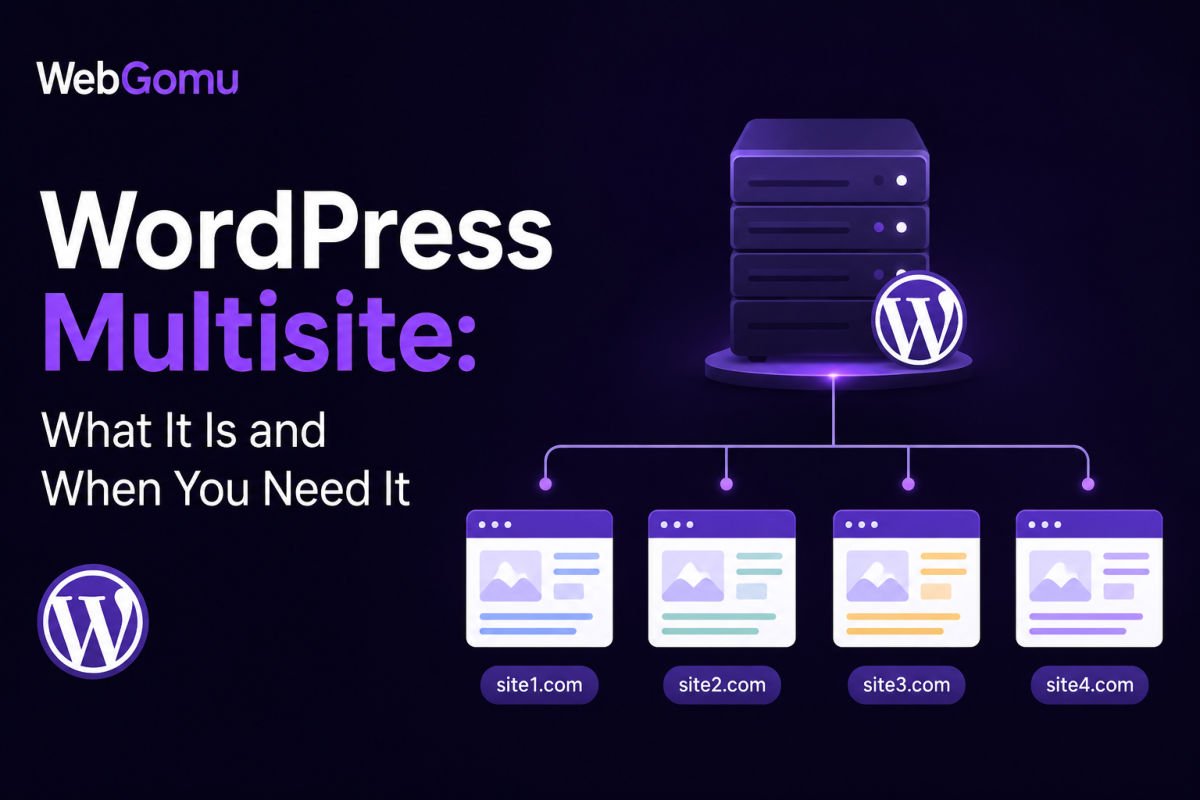
WordPress Multisite is a built-in feature that converts a single WordPress installation into a network of multiple sites, sharing the same core files, plugins, and themes, while each site keeps its own posts, pages, media, and users. It’s genuinely valuable for closely related sites under one organization, franchises, universities, or agencies wanting centralized control. It’s usually the wrong choice for unrelated sites, heavily customized individual sites, or situations needing full independence between properties.
Before You Start
Make sure you have the following in place first:
- A complete backup of your database and files (see our backup guide), enabling Multisite makes structural changes that are difficult to fully reverse
- Hosting that supports wildcard DNS subdomains, if you plan to use a subdomain structure
- PHP 8.1 or higher, 8.3 is currently recommended
If you’ve gone from managing one WordPress site to juggling three, four, or more, each with its own separate login, updates, and backups, Multisite is designed for exactly this problem. But it’s not automatically the right answer for every multi-site situation, and getting this decision wrong is genuinely hard to undo later.
What You’ll Learn
- What Multisite actually shares versus keeps separate
- Who genuinely benefits from it, and who doesn’t
- How it compares to the alternatives
- What to know before enabling it, since it’s not easily reversible
What Multisite Actually Is
Multisite is a built-in WordPress feature, not a plugin, that turns one installation into a network of sites. Each individual site retains its own posts, pages, media library, and settings. But the network as a whole shares the same WordPress core files, the same database server, and the same plugin and theme files on disk. A Super Admin oversees the entire network, while individual site admins typically have more limited control, they generally can’t install their own plugins, that stays a Super Admin decision.
The Real Advantages
- Update once, apply everywhere. A plugin, theme, or core update happens a single time and applies across every site in the network.
- Consistent branding is easy to enforce. A network-activated theme forces every site to use it, useful for franchises needing visual consistency.
- Lower resource duplication. You’re not storing separate copies of the same themes and plugins for every site.
- Spinning up a new site is fast. Once the network exists, adding another site takes seconds, not a full new installation.
The Real Trade-Offs
- All sites share the same performance envelope. A traffic spike or security issue on one site can affect the whole network.
- Not every plugin is fully Multisite-compatible. Some don’t handle network activation correctly, or store data in ways that conflict with the shared database structure.
- It’s difficult to reverse. Enabling Multisite modifies your database structure and wp-config.php permanently, undoing it isn’t an official, simple process.
- Individual site admins have less independence, which can be a real limitation if sites genuinely need to operate autonomously.
Multisite vs. the Alternatives
| Situation | Better Fit |
|---|---|
| Closely related sites needing shared branding and centralized control | Multisite |
| Unrelated client sites needing independent plugins, themes, and hosting | Separate installations, managed with a tool like MainWP or ManageWP |
| One site needing multiple language versions | A multilingual plugin like WPML or TranslatePress |
| Multiple frontends pulling from one shared content source | A headless WordPress setup |
If you’re managing separate client sites specifically, we cover the more common approach for that exact situation, separate installations with centralized management tooling, in our dedicated guide to managing multiple client sites.
When You Genuinely Need Multisite
- Franchise businesses where each location needs its own site with shared branding and functionality
- Universities or school districts running department or campus sites under one umbrella
- Media organizations running multiple related publications from shared infrastructure
- Agencies who genuinely want centralized, shared theme and plugin control across sites they fully manage
WebGomu Tip: If your “multiple sites” are actually unrelated in branding, audience, and functionality, resist the pull toward Multisite just because it sounds efficient. It’s built for genuinely related sites. Forcing unrelated sites into one network usually creates more constraints than it saves in convenience.
Subdomain, Subdirectory, or Domain Mapping
When setting up a network, you choose between subdomains (site1.yourdomain.com), subdirectories (yourdomain.com/site1), or domain mapping, giving each site its own fully custom domain (sitea.com, siteb.com), natively supported by WordPress core since version 4.5. Domain mapping is the right choice if you want each site to feel and function as a fully independent, uniquely-branded property despite sharing the same underlying network.
A Quick Note on SEO
Each site within a Multisite network is treated as a genuinely separate site by search engines. Using subdirectories means sites share the main domain’s overall authority to some degree, while subdomains and mapped domains are typically treated more independently.
Before You Enable It: A Checklist
- Take a complete backup, database and files both
- Confirm your PHP version meets current requirements
- Confirm wildcard DNS support with your host if using subdomains
- Test your key plugins for Multisite compatibility on a staging site first, not directly on a live network
Troubleshooting
A plugin isn’t working correctly across my network
Check whether the plugin explicitly supports network activation. Some plugins work fine per-site but behave unexpectedly when network-activated across a shared database structure.
I’m having second thoughts after enabling Multisite
Reverting isn’t an official one-click process, it requires exporting each site’s content individually and importing it into separate standalone installations. This is exactly why a full backup and careful planning before enabling it matters so much.
My sites are slowing down since moving to Multisite
Since all sites share the same performance envelope, a resource-heavy site or plugin on one property can affect the whole network. Consider whether your hosting plan genuinely has enough capacity for the combined load of every site in the network.
Common Mistakes
- Choosing Multisite for genuinely unrelated sites, just because managing several sites individually feels tedious.
- Enabling it without a full backup first, given how difficult it is to reverse.
- Assuming every plugin will work identically in a Multisite environment without testing first.
- Underestimating that a problem on one site can affect the entire shared network.
Recommended Tools
- WordPress Multisite (built-in) — no plugin required, native to WordPress core
- MainWP or ManageWP — better fit for managing several genuinely separate, unrelated site installations
Key Takeaways
- Multisite shares core files, plugins, and themes across a network, while keeping each site’s content and users separate.
- It genuinely suits closely related, commonly-branded sites, not unrelated ones.
- It’s difficult to reverse, plan carefully and back up fully before enabling it.
- For managing separate, unrelated client sites, separate installations with centralized management tooling are usually the better fit.
Frequently Asked Questions
Is WordPress Multisite a plugin?
No, it’s a built-in WordPress core feature. No plugin installation is required to enable it, though plugins may be used to help manage a network once created.
Can I easily undo WordPress Multisite once it’s enabled?
Not easily. Reverting isn’t an official, one-click process, it typically requires exporting each site’s content individually and reimporting it into separate standalone installations.
Do all plugins work correctly with Multisite?
Not all. Some plugins don’t handle network activation correctly or store data in ways that conflict with Multisite’s shared database structure. Testing on a staging network first is recommended.
Is Multisite a good fit for managing unrelated client websites?
Generally no. Separate installations managed with a tool like MainWP or ManageWP typically offer more independence and flexibility for genuinely unrelated sites.
Can each site in a Multisite network have its own custom domain?
Yes, through domain mapping, natively supported by WordPress core since version 4.5, allowing each site its own fully custom domain instead of a shared subdomain or subdirectory.
Resources Links
Author:

Christoper Enolpe
Founder of WebGomu • WordPress Freelancer with 10+ Years of Experience
Christoper is the founder of WebGomu and a WordPress freelancer with over 10 years of hands-on experience building, optimizing, and maintaining WordPress websites. He writes practical, beginner-friendly guides based on real-world experience, covering WordPress, SEO, website performance, and AI tools to help readers build better websites with confidence.
Learn more: https://webgomu.com/about/
Get one WordPress tip every week
Start Here

The Ultimate Beginner’s Guide to WordPress (2026): Build Your First Website Without Coding
Popular Guides
Our Partner

More from the blog
WordPress Maintenance Checklist: Monthly and Quarterly Tasks
Managing Multiple WordPress Client Sites: A Freelancer’s Guide (2026)