What Is Headless WordPress? A Beginner’s Introduction

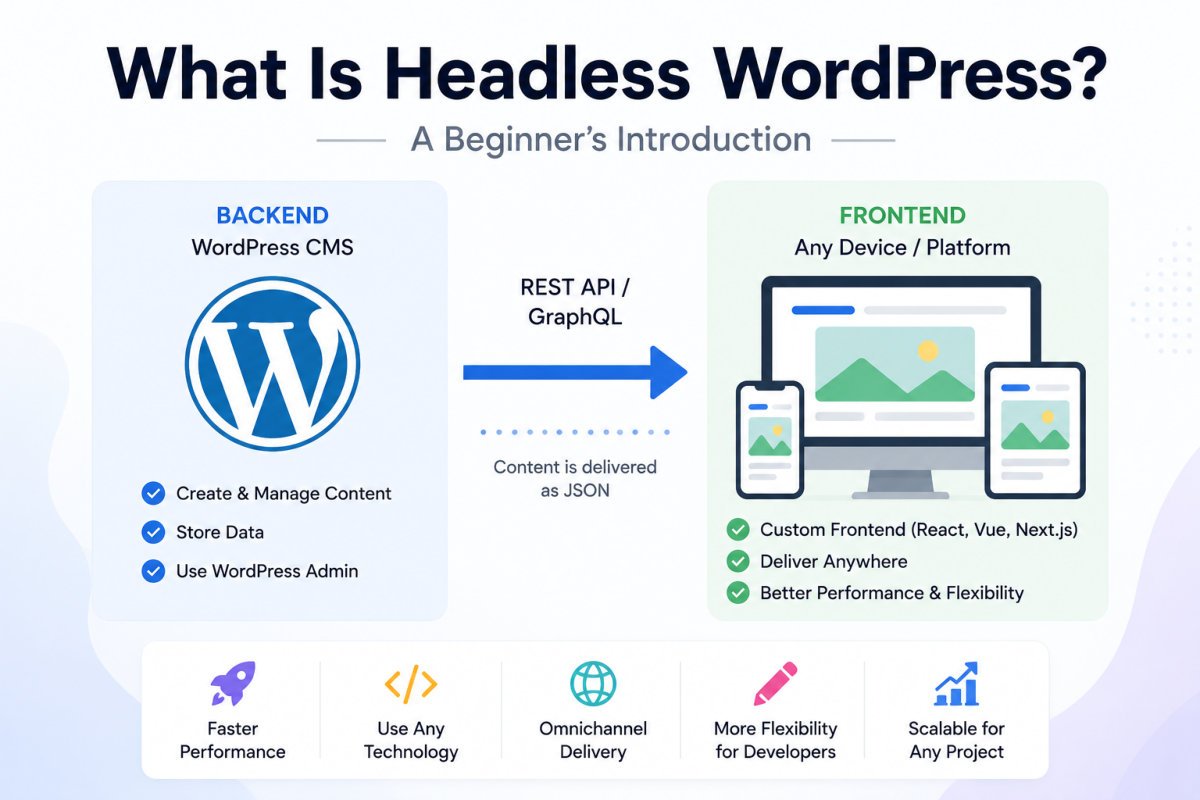
Headless WordPress means using WordPress only as a content management backend, the admin dashboard, database, and editorial workflow, while a completely separate front-end application (built with a modern framework like Next.js or Astro) handles what visitors actually see. WordPress no longer generates the visible webpage itself, it just stores and manages the content, which a different system fetches through an API and displays independently. It’s a genuinely powerful architecture for specific, larger-scale needs, but it’s a second-stage skill, not a starting point, and it’s overkill for the vast majority of beginner and small business sites.
Before You Start
This is a conceptual introduction, not a setup tutorial. If you’re currently building your first WordPress site, everything covered in our beginner’s guide is the right starting point, headless is genuinely not something to consider yet.
You may have come across the term “headless WordPress” and wondered if it’s something you’re missing out on. Short answer: almost certainly not, at least not yet. But it’s worth understanding what it actually means, since it explains a lot about how larger, more complex websites are increasingly built.
What You’ll Learn
- What “headless” actually means, in plain terms
- How content gets from WordPress to a headless front end
- Why some sites genuinely benefit from this setup
- Why it’s the wrong starting point for almost every beginner
A Simple Way to Think About It
Picture traditional WordPress like a restaurant. The kitchen (your WordPress backend, the admin dashboard and database) and the dining room (your theme, the part visitors actually see) are part of the same building, managed together. When someone visits your site, WordPress builds the page and serves it directly, kitchen to table, all in one place.
Headless WordPress removes the dining room. The kitchen still exists, WordPress still manages your content, but a completely separate system handles the “dining room” experience instead, often built with a modern JavaScript framework rather than a traditional WordPress theme.
How the Two Sides Actually Connect
WordPress still stores everything, but instead of building the visible page itself, it makes content available through an API, a structured way for another system to request exactly the data it needs.
- WP REST API — built into WordPress core, no extra setup required, though it can return more data than needed in a single request
- WPGraphQL — a plugin-based alternative that lets the front end request precisely the fields it needs, generally the preferred option for serious headless builds
The separate front end, built with something like Next.js, Astro, or SvelteKit, requests content through one of these APIs and renders the actual page visitors see.
Why Some Sites Genuinely Use This
- Very fast load times, especially with edge rendering, serving pages from servers geographically close to each visitor
- Delivering content to multiple channels at once, a website, a mobile app, even a smartwatch or kiosk, all pulling from the same WordPress content source
- Scalability for very high-traffic or complex enterprise sites
Why It’s Usually the Wrong Starting Point
Headless architecture is genuinely more complex, you’re now managing three separate things instead of one: the WordPress backend, a separate front-end codebase, and a hosting platform for that front end. It typically requires a development team comfortable with modern JavaScript frameworks, not just WordPress knowledge, and costs meaningfully more to build and maintain. For the vast majority of blogs, portfolios, and small business sites, this complexity buys you very little that a well-optimized traditional WordPress setup doesn’t already deliver.
WebGomu Tip: If you’re not already hitting a specific, real limitation with traditional WordPress, slow multi-channel delivery, a genuine need to serve the same content to a mobile app and a website simultaneously, headless isn’t solving a problem you actually have yet. Master the standard, monolithic setup first.
An Important Connection to AI Search
As covered in our AI search optimization guide, WordPress’s traditional architecture serves pages as complete, server-rendered HTML by default, which AI crawlers can process directly. If you do ever run a headless setup, server-side rendering becomes essential, not optional, if key content only appears after client-side JavaScript rendering, AI crawlers may see an effectively empty page, undoing exactly the visibility this guide’s broader cluster is built around.
Common Mistakes
- Assuming headless is automatically “better” or more modern, rather than a specific tool for specific, larger-scale needs.
- Attempting a headless setup as a first WordPress project, before understanding traditional WordPress at all.
- Underestimating the ongoing development cost and complexity of maintaining two separate systems.
- Running a headless or JavaScript-heavy front end without server-side rendering, risking invisibility to AI crawlers.
Recommended Tools
- WP REST API — built into WordPress core, the simplest starting point if you ever explore this
- WPGraphQL — the more efficient, widely preferred option for serious headless builds
We’re not recommending beginners pursue either of these right now, they’re worth knowing exist, not worth acting on until you have a specific, real need that traditional WordPress genuinely can’t meet.
Key Takeaways
- Headless WordPress separates content management (WordPress) from the visitor-facing front end (a separate modern framework).
- Content connects through an API, either the built-in REST API or the more efficient WPGraphQL.
- It genuinely benefits very high-traffic or multi-channel enterprise use cases.
- For almost every beginner or small business site, traditional WordPress remains the right choice, headless is a second-stage skill, not a starting point.
Frequently Asked Questions
Is headless WordPress better than regular WordPress?
Not universally, it’s suited to specific needs like very high traffic, multi-channel content delivery, or advanced performance requirements. For most blogs and small business sites, traditional WordPress is genuinely the better, simpler choice.
Do I need to know how to code to use headless WordPress?
Yes, meaningfully so. A headless setup typically requires comfort with a modern JavaScript framework in addition to WordPress itself, a significant step up from standard WordPress use.
Does headless WordPress still use the WordPress dashboard?
Yes, the admin dashboard, content editing, and database remain WordPress. Only the visitor-facing front end is replaced by a separate system.
Is headless WordPress good for SEO and AI search visibility?
It can be, but only with proper server-side rendering. Without it, AI crawlers and search engines may not see your content correctly, since it exists only after client-side JavaScript runs.
Should a beginner start with headless WordPress?
No. It’s considered a second-stage skill best approached after thoroughly understanding traditional, monolithic WordPress first.
Resources Links
Author:

Christoper Enolpe
Founder of WebGomu • WordPress Freelancer with 10+ Years of Experience
Christoper is the founder of WebGomu and a WordPress freelancer with over 10 years of hands-on experience building, optimizing, and maintaining WordPress websites. He writes practical, beginner-friendly guides based on real-world experience, covering WordPress, SEO, website performance, and AI tools to help readers build better websites with confidence.
Learn more: https://webgomu.com/about/
Get one WordPress tip every week
Start Here

The Ultimate Beginner’s Guide to WordPress (2026): Build Your First Website Without Coding
Popular Guides
Our Partner
