WP-Optimize Review 2026: All-in-One, or One Too Many?

WP-Optimize is a genuinely all-in-one performance plugin, database cleanup, page caching, image compression, and minification, from David Anderson and Team Updraft, the same developers behind UpdraftPlus. It’s actively maintained since 2009, runs on over 1 million active sites, and holds a 4.8/5 rating across 2,590 reviews. The honest catch: its all-in-one design means genuine feature overlap if you’re already running a dedicated caching plugin or image optimizer, worth configuring carefully rather than running everything simultaneously.
Before You Start
See our speed mistakes guide for the broader context, this review assumes you’re deciding specifically whether WP-Optimize fits your existing setup.
WP-Optimize already earned a mention in our speed mistakes guide as a solid database cleanup option, worth a closer, dedicated look now, especially given how many other tools on this site do pieces of what it also claims to handle.
What You’ll Learn
- What genuinely stands out about WP-Optimize’s database cleanup and track record
- A real overlap risk if you’re already using other WebGomu-recommended tools
- What’s actually free versus what requires Pro
- How its support responsiveness holds up under real numbers
What’s Genuinely Excellent
- Built by the UpdraftPlus team. David Anderson and Team Updraft have maintained WP-Optimize since 2009, 17 years of active development, a genuine, verifiable track record in the WordPress ecosystem.
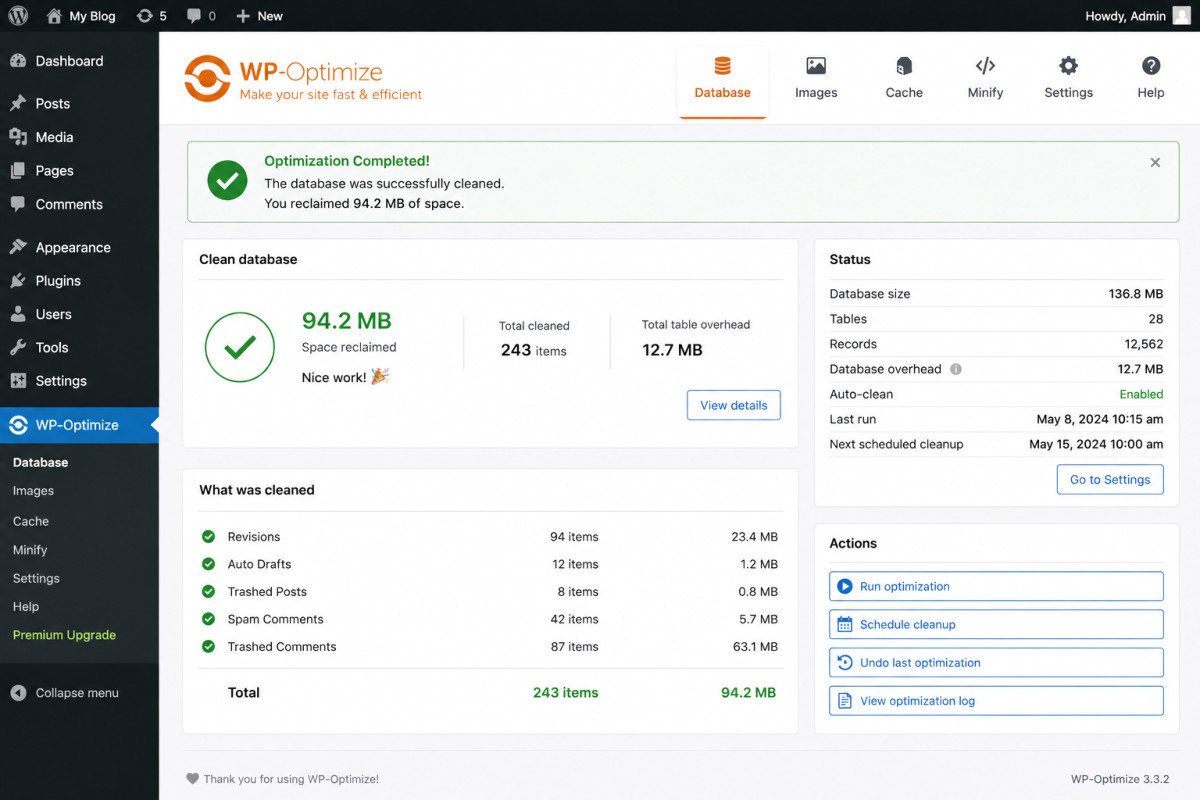
- Strong database cleanup specifically. Removing post revisions, spam comments, and transient options is genuinely simple, scheduled cleanups run with a few clicks, and the interface shows exactly how much space was reclaimed.
- A large, well-regarded install base. Over 1 million active installs and a 4.8/5 rating across 2,590 reviews, a genuine trust signal at this scale.
- Genuinely beginner-friendly interface, most features activate with a single click, no advanced configuration required to get real value.
A Real Overlap Risk Worth Knowing
This is the most important thing to understand before installing it: WP-Optimize’s caching and image compression features genuinely overlap with dedicated tools you may already be using. If you’re already following our caching plugin recommendations or using ShortPixel or a similar image optimizer, running WP-Optimize’s equivalent built-in features alongside them isn’t necessarily dangerous, but it does require careful configuration to avoid redundancy or conflicts, and caching conflicts specifically have been reported to occasionally serve stale content when multiple caching layers interact unexpectedly.
What’s Free vs. What Needs Pro
The free version covers database cleanup, basic page caching, and core minification, genuinely comprehensive for many sites on its own. Pro adds more advanced caching options, multisite support, WebP image conversion, and scheduled optimizations, worth it specifically for small to medium businesses needing that additional depth.
WebGomu Tip: If you already have a dedicated caching plugin and image optimizer installed, use WP-Optimize specifically for database cleanup and disable its overlapping caching and image features. This gets you the genuine strength of the tool, its database work, without the redundancy risk.
Support: A Real, Moderate Number
Worth including an honest, specific data point rather than a vague impression: recent tracking shows roughly 63% of support threads resolved within a two-month window, a reasonable, if not exceptional, resolution rate. Not a red flag, but not a standout either, worth setting expectations accordingly.
Who Should Use WP-Optimize
Genuinely strong fit as a standalone, all-in-one solution for sites that haven’t yet committed to separate caching and image optimization tools, or specifically for its database cleanup capability alongside tools you already trust.
Who Might Want to Look Elsewhere
If you already have a dedicated caching plugin and image optimizer you’re happy with, running WP-Optimize’s overlapping features adds complexity without clear added benefit, use it selectively for database cleanup instead.
Common Mistakes
- Running WP-Optimize’s caching alongside a separate dedicated caching plugin without disabling one, risking conflicts and stale content.
- Not checking for feature overlap with tools already installed before activating everything WP-Optimize offers.
- Assuming the free version’s caching depth matches dedicated caching plugins, some advanced options are Pro-only.
- Skipping scheduled database cleanups after initial setup, letting the same bloat accumulate again over time.
Key Takeaways
- WP-Optimize is built by the same team behind UpdraftPlus, a genuine, verifiable 17-year track record.
- Its database cleanup capability is genuinely strong and simple to use, even in the free version.
- Real feature overlap with dedicated caching and image tools requires careful configuration to avoid conflicts.
- Support resolution sits at a reasonable but unremarkable 63% within a recent two-month window.
Frequently Asked Questions
Who makes WP-Optimize?
David Anderson and Team Updraft, the same developers behind UpdraftPlus, a widely used WordPress backup plugin, giving WP-Optimize a genuine, verifiable development track record dating back to 2009.
Should I use WP-Optimize if I already have a caching plugin?
It’s worth configuring carefully rather than running both fully active. Disabling WP-Optimize’s overlapping caching features and using it specifically for database cleanup avoids potential conflicts while still getting its genuine strength.
Is WP-Optimize’s free version good enough for most sites?
Yes, for many sites, the free version covers database cleanup, basic caching, and core minification. Pro adds advanced caching options, multisite support, and WebP conversion for sites needing that additional depth.
Can WP-Optimize cause caching conflicts?
It can, particularly when running alongside other caching plugins or with certain custom themes, occasionally resulting in stale content being served, worth monitoring after setup.
How responsive is WP-Optimize’s support?
Reasonably, recent tracking shows roughly 63% of support threads resolved within a two-month window, a moderate, dependable rate rather than an exceptional one.
Resources Links
- The Ultimate Beginner’s Guide to WordPress (2026)
- Common WordPress Speed Mistakes (And How to Fix Them)
- Best WordPress Caching Plugins Compared
- UpdraftPlus Review 2026
Learn more directly from the source: Visit WP-Optimize’s official website for current pricing and full feature details.
Author:

Christoper Enolpe
Founder of WebGomu • WordPress Freelancer with 10+ Years of Experience
Christoper is the founder of WebGomu and a WordPress freelancer with over 10 years of hands-on experience building, optimizing, and maintaining WordPress websites. He writes practical, beginner-friendly guides based on real-world experience, covering WordPress, SEO, website performance, and AI tools to help readers build better websites with confidence.
Learn more: https://webgomu.com/about/
Get one WordPress tip every week
Start Here

The Ultimate Beginner’s Guide to WordPress (2026): Build Your First Website Without Coding
Popular Guides
Our Partner

More from the blog

WPCode Review 2026: The Safe Way to Add Custom Code

AI Photo Editing Tools for WooCommerce Product Photos (2026)