WordPress Permalinks Explained (And Why Changing Them Is Risky)

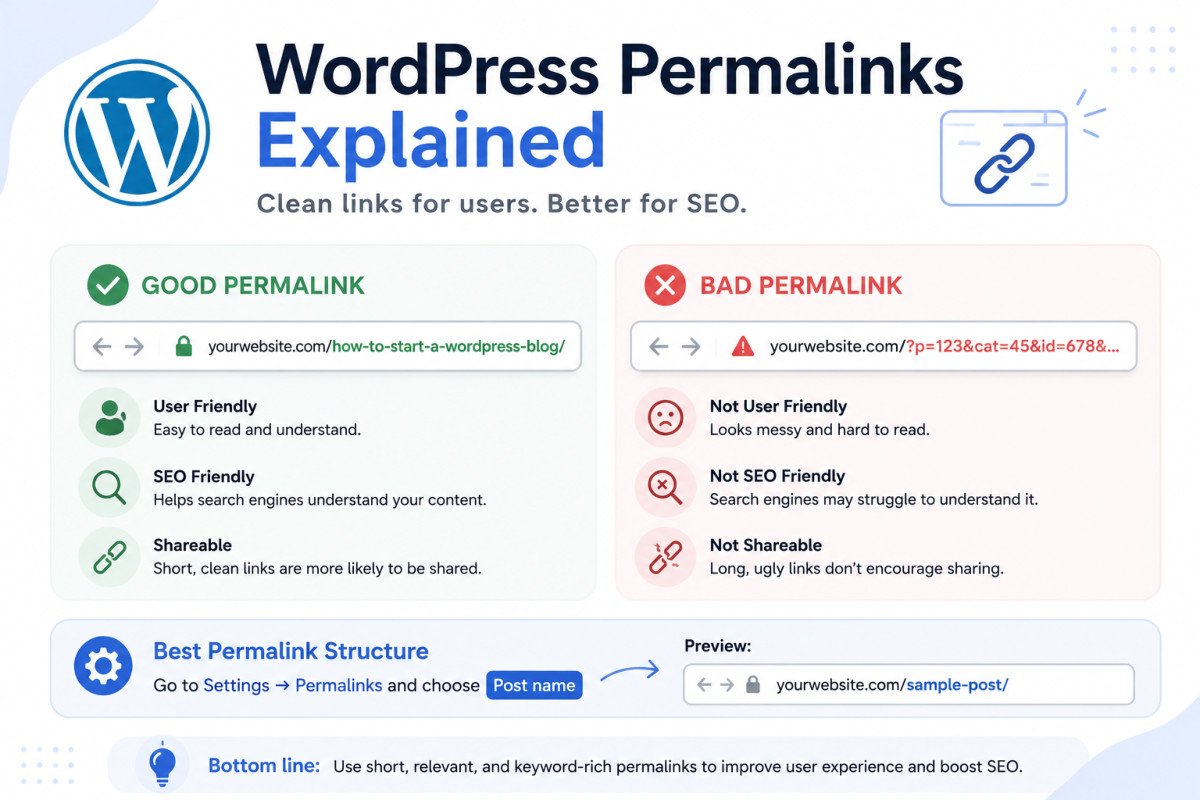
A permalink is the permanent URL for a post, page, or other piece of content on your site. For most WordPress sites, “Post Name” (yourdomain.com/post-title/) is the recommended structure, clean, readable, and free of dates or category prefixes that can break later. Set this once, early, under Settings → Permalinks. The single most important thing to know: changing your permalink structure on a site that already has published, indexed content can genuinely destroy your existing SEO rankings if you don’t set up proper redirects first.
Before You Start
If you haven’t installed WordPress yet, see our installation guide first, this article is most useful once you’re ready to configure your site’s settings, or if you’re reconsidering a structure you already have live.
Every WordPress site has a small settings screen that quietly shapes every single URL you’ll ever publish, and most beginners click past it in about four seconds without a second thought. That’s usually fine on day one. It’s genuinely risky to revisit carelessly once your site has real content and real rankings attached to it.
What You’ll Learn
- What a permalink actually is, and why the structure matters
- Why “Post Name” is the widely recommended default
- Which structures to avoid, and specifically why
- The safe way to change your permalink structure if you ever need to
What a Permalink Actually Is
“Permalink” is short for permanent link, the actual, stable web address for a specific post, page, product, or archive on your site. WordPress generates these automatically based on a structure you choose once, under Settings → Permalinks.
Comparing the Structures
| Structure | Example | Recommended? |
|---|---|---|
| Plain (default) | yourdomain.com/?p=123 | No, no SEO value, unreadable |
| Day and name | yourdomain.com/2026/07/29/post-title/ | No, looks outdated immediately |
| Month and name | yourdomain.com/2026/07/post-title/ | No, same dating problem |
| Category-based | yourdomain.com/category/post-title/ | No, breaks if you ever re-categorize the post |
| Post name | yourdomain.com/post-title/ | Yes, the recommended default for most sites |
Why “Post Name” Is the Recommended Default
Clean URLs like yourdomain.com/how-to-install-wordpress/ are easier for visitors to read, remember, and share, and give search engines clear context about what the page is actually about. Worth being accurate here: URL structure itself is a fairly minor, indirect ranking factor, keywords in the URL help context and readability more than they directly boost rankings. The bigger, genuine benefit is user experience and site structure, both of which do meaningfully affect how visitors and search engines navigate your site.
Why the Other Structures Fall Short
- Plain offers no readability and no SEO context whatsoever, purely a string of numbers.
- Date-based structures visibly date your content, a 2021 date in the URL makes even genuinely current content look stale at a glance.
- Category-based structures carry a specific, real risk: if you ever move a post to a different category, its URL changes too, breaking every existing link, bookmark, and search ranking pointing to the old address.
A Critical Warning: Changing This Later Is Genuinely Risky
This deserves emphasis, not a footnote: changing your permalink structure after your site already has indexed, ranking content can genuinely destroy your existing SEO rankings if done carelessly. Every URL on your site changes at once, and without redirects in place, search engines and anyone with an old link or bookmark hit a dead page.
WebGomu Tip: Choose your permalink structure as early as possible, ideally right after installing WordPress, before you’ve published anything. Getting this right on day one avoids the entire risk described above, it’s a genuinely easy decision to make correctly upfront and a genuinely painful one to fix later.
How to Change Permalinks Safely (If You Must)
- Back up your site first (see our backup guide), files and database both.
- Go to Settings → Permalinks, select the new structure, and save.
- Set up 301 redirects from every old URL to its new equivalent, this step is not optional.
- Test a sample of your old URLs directly to confirm they redirect correctly.
- Monitor 404 errors and traffic in Search Console for the following few weeks.
A Note for WooCommerce Stores
If you’re running WooCommerce, product and product category permalinks can be configured separately from your regular post permalinks, worth reviewing both settings, not just your main site structure, when setting things up.
Common Mistakes
- Leaving the default “Plain” structure active without realizing it offers no SEO or readability value.
- Changing permalink structure on an established site without setting up 301 redirects first.
- Choosing a category-based structure, then later re-categorizing posts and unknowingly breaking their URLs.
- Including unnecessary dates, numbers, or symbols in individual post URLs beyond the base structure.
Recommended Tools
- Rank Math — can help manage redirects if you ever do need to change your structure, see our setup guide
- UpdraftPlus — for the backup you should have before any structural change, see our review
Key Takeaways
- “Post Name” is the recommended permalink structure for most WordPress sites.
- Avoid date-based and category-based structures, both carry real, specific long-term risks.
- Choose your structure early, before publishing, to avoid ever needing to change it later.
- If you must change it on an established site, 301 redirects are genuinely non-negotiable.
Frequently Asked Questions
What’s the best permalink structure for WordPress?
“Post Name” (yourdomain.com/post-title/) is the widely recommended default for most sites, clean, readable, and free of the risks that come with date-based or category-based structures.
Can I change my permalink structure after my site is already live?
Yes, but carefully. Changing it without setting up 301 redirects from old URLs to new ones can genuinely destroy your existing SEO rankings, this step is essential, not optional.
Why shouldn’t I use dates in my permalinks?
A visible date in the URL makes even current, accurate content look outdated at a glance, and it adds no real SEO benefit over a clean post-name structure.
Why is the category-based permalink structure risky?
If you ever move a post to a different category, its URL changes too, breaking every existing link, bookmark, and search ranking pointing to the original address.
Do keywords in my URL directly improve my rankings?
Only indirectly. URL structure is a fairly minor ranking factor on its own, the bigger benefit comes from improved readability and user experience, which do meaningfully affect how visitors and search engines interact with your site.
Resources Links
Author:

Christoper Enolpe
Founder of WebGomu • WordPress Freelancer with 10+ Years of Experience
Christoper is the founder of WebGomu and a WordPress freelancer with over 10 years of hands-on experience building, optimizing, and maintaining WordPress websites. He writes practical, beginner-friendly guides based on real-world experience, covering WordPress, SEO, website performance, and AI tools to help readers build better websites with confidence.
Learn more: https://webgomu.com/about/
Get one WordPress tip every week
Start Here

The Ultimate Beginner’s Guide to WordPress (2026): Build Your First Website Without Coding
Popular Guides
Our Partner

More from the blog

WPCode Review 2026: The Safe Way to Add Custom Code
WordPress REST API Explained: A Beginner’s Guide (2026)