GenerateBlocks Review 2026: Lightweight, But Is It Fast to Use?

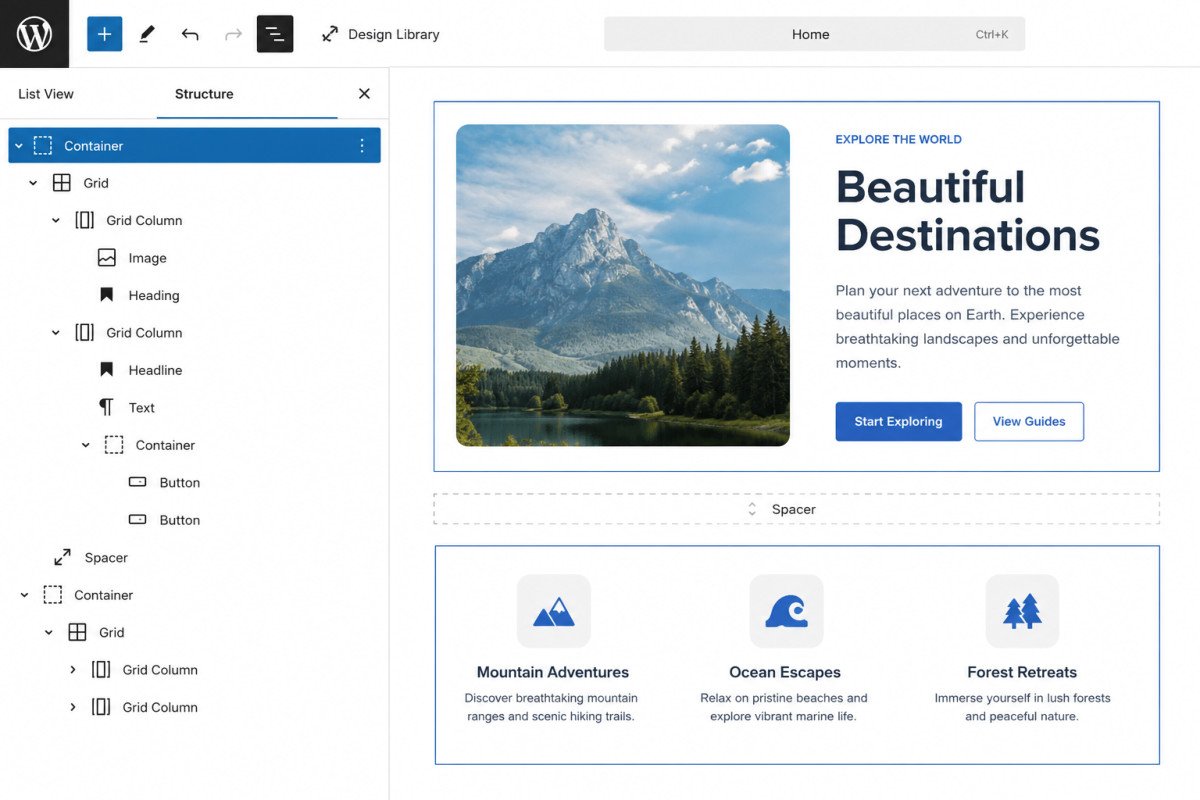
GenerateBlocks is a genuinely lightweight, Gutenberg-native block plugin, verified reviewers consistently report strong PageSpeed scores (95+ on mobile and desktop) thanks to clean code with no jQuery dependency. It works with any WordPress theme, not just GeneratePress, though the two pair naturally since they share a developer. The honest trade-off: it’s fast for your site, not necessarily fast to build with, verified users consistently note it takes longer to construct complex designs compared to drag-and-drop visual builders. Pricing is also more confusing than it should be, worth reading the breakdown below before comparing it against alternatives.
Before You Start
If you’re deciding between a page builder and native block-based tools generally, see our Elementor vs Gutenberg comparison first, this review assumes you’re evaluating GenerateBlocks specifically.
GenerateBlocks keeps coming up in our own research as the lightest-weight alternative to heavier page builders. That reputation is genuinely earned on performance. Whether it’s the right fit depends heavily on how you like to build, and that’s the part worth understanding clearly before choosing it.
What You’ll Learn
- What genuinely stands out about GenerateBlocks’ performance and code quality
- The real trade-off between build speed and site speed
- A clear breakdown of pricing, which is more confusing across sources than it should be
- Who this genuinely fits, and who’s better served by a visual builder instead
What’s Genuinely Excellent
- Consistently strong performance. Controlled testing reports PageSpeed scores of 95+ on both mobile and desktop, with no jQuery dependency and no render-blocking scripts weighing the page down.
- Clean, predictable code. Verified users consistently praise how easy it is to hand off client sites built with GenerateBlocks, thanks to consistent settings across elements and a clear structure panel showing exact nesting.
- Works with any WordPress theme, not locked to GeneratePress, though the two are built by the same team and genuinely pair well together.
- Strong, responsive support, consistently praised as helpful and educational across independent reviews, not just quick to respond but genuinely useful.
- The free version is functional, not a stripped demo. You can build most standard layouts with the free blocks alone.
What Real Users Flag as Frustrating
- It’s slower to build with than a visual drag-and-drop builder. This is the most consistent, honest trade-off reported: GenerateBlocks rewards learning its structured, block-based approach, but complex designs genuinely take longer to construct than in a tool like Elementor.
- Pro unlocks meaningfully more capability. Patterns, global styles, and animations live behind the paid tier, the free version covers basics well, but real design speed improvements come with Pro.
- A degree of lock-in. Because layouts are built through GenerateBlocks’ own block structure, switching to a different builder or theme later can require rebuilding designs rather than a clean migration.
Pricing: More Confusing Than It Should Be
Reported pricing varies in presentation across sources, worth clarifying directly:
| Option | Price | What’s Included |
|---|---|---|
| GenerateBlocks (free) | $0 | Core blocks, functional for standard layouts |
| GenerateBlocks Pro (standalone) | ~$99/year | Patterns, global styles, animations |
| GeneratePress One (bundle) | ~$149/year, up to 500 sites | GP Premium theme + GenerateBlocks Pro + GenerateCloud, all together |
If you’re already planning to use the GeneratePress theme’s premium version, the bundled GeneratePress One plan is generally the better value than buying GenerateBlocks Pro separately, worth comparing both directly on GeneratePress’ own site before purchasing either individually.
WebGomu Tip: If you’re building client sites regularly, the clean handoff experience users consistently praise is worth weighing against the slower build time. For a site you’ll build once and rarely touch again, that trade-off matters less than for an agency building many similar sites repeatedly.
Who Should Use GenerateBlocks
Developers and site owners who prioritize performance and clean code above build speed, and who don’t mind a genuine learning curve in exchange for a lightweight, portable foundation.
Who Might Want to Look Elsewhere
If you want the fastest possible building experience and don’t mind slightly more page weight, Kadence Blocks (see our dedicated review) or a full visual builder may fit better. If you specifically want true drag-and-drop, Elementor remains the more direct fit, covered in our Elementor vs Gutenberg comparison.
Common Mistakes
- Expecting a drag-and-drop visual experience, GenerateBlocks is structured and block-based, not click-and-drag.
- Buying GenerateBlocks Pro standalone without first comparing it against the GeneratePress One bundle price.
- Building extensively in GenerateBlocks without considering the rebuild effort required if switching builders later.
- Assuming the free version is too limited to use, it’s genuinely functional for standard layouts.
Key Takeaways
- GenerateBlocks delivers genuinely strong site performance with clean, portable code.
- The real trade-off is build speed, it takes longer to construct complex designs than a visual drag-and-drop builder.
- Compare GenerateBlocks Pro standalone against the GeneratePress One bundle before purchasing either.
- Best suited to developers and agencies who value performance and clean client handoffs over building speed.
Frequently Asked Questions
Does GenerateBlocks only work with the GeneratePress theme?
No, it works with any WordPress theme, though it’s built by the same team as GeneratePress and pairs naturally with it.
Is GenerateBlocks faster to build with than Elementor?
No, it’s the opposite trade-off. GenerateBlocks produces faster-loading sites, but verified users consistently report it takes longer to construct complex designs than a visual drag-and-drop builder like Elementor.
Should I buy GenerateBlocks Pro or the GeneratePress One bundle?
If you’re already planning to use GeneratePress’ premium theme features, the GeneratePress One bundle is generally better value than purchasing GenerateBlocks Pro separately.
Is GenerateBlocks’ free version good enough to build a full site?
Yes, for standard layouts. Patterns, global styles, and animations specifically require the Pro version.
Is there a risk of lock-in with GenerateBlocks?
Some, yes. Layouts are built through its own block structure, so switching to a different builder or theme later may require rebuilding designs rather than a clean migration.
Resources Links
- The Ultimate Beginner’s Guide to WordPress (2026)
- Best Free Alternatives to Elementor Pro
- Kadence Blocks Review 2026
- Elementor vs Gutenberg: Which Page Builder Should You Use?
Learn more directly from the source: Visit GenerateBlocks’ official website for current pricing and full feature details.
Author:

Christoper Enolpe
Founder of WebGomu • WordPress Freelancer with 10+ Years of Experience
Christoper is the founder of WebGomu and a WordPress freelancer with over 10 years of hands-on experience building, optimizing, and maintaining WordPress websites. He writes practical, beginner-friendly guides based on real-world experience, covering WordPress, SEO, website performance, and AI tools to help readers build better websites with confidence.
Learn more: https://webgomu.com/about/
Get one WordPress tip every week
Start Here

The Ultimate Beginner’s Guide to WordPress (2026): Build Your First Website Without Coding
Popular Guides
Our Partner

More from the blog

WPCode Review 2026: The Safe Way to Add Custom Code

AI Photo Editing Tools for WooCommerce Product Photos (2026)