UpdraftPlus Review 2026: Do You Even Need It?

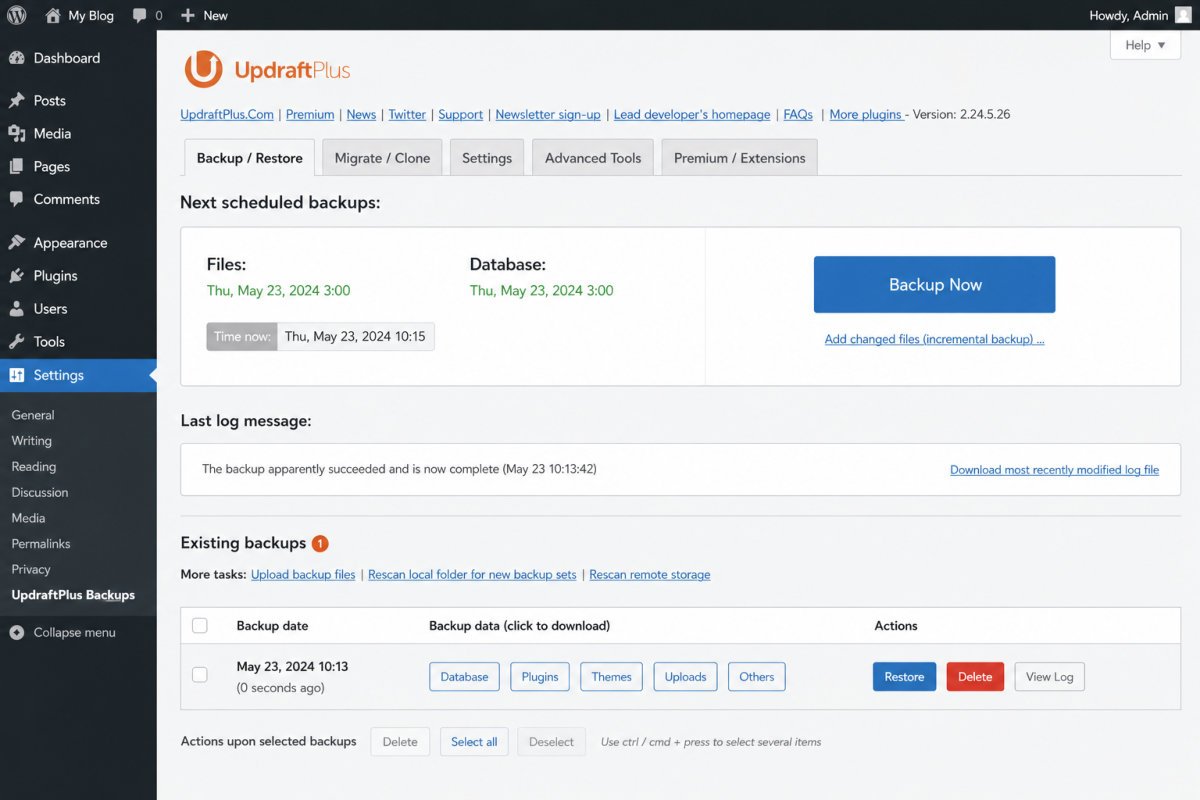
UpdraftPlus is a reliable, genuinely easy-to-use backup plugin, and it’s what WebGomu recommends in its own backup guide. Verified users consistently praise its one-click restore and cloud storage integrations, but just as consistently flag two real annoyances: persistent dashboard notifications that return even after being dismissed, and pricing, particularly the migration/clone add-on, that several reviewers describe as expensive relative to competitors. One honest nuance worth knowing upfront: if your hosting already includes quality server-level backups, you may not need UpdraftPlus at all.
Before You Start
If you’re looking for setup instructions rather than a verdict, see our backup setup guide instead, this review assumes you’re deciding whether UpdraftPlus is the right tool for your situation.
UpdraftPlus is one of the most widely installed WordPress backup plugins, and one we recommend ourselves. But “widely used” doesn’t automatically mean “right for you,” especially if your hosting already handles backups at the server level. This review looks at what verified users actually report, the good and the genuinely annoying, plus an honest question most reviews skip entirely: do you need this at all?
What You’ll Learn
- What genuinely stands out about UpdraftPlus, according to real user reports
- The two consistent frustrations verified users flag
- An honest case for when you might not need it
- How free and Premium pricing actually compares
What’s Genuinely Excellent
- Genuinely easy to set up, verified reviewers consistently note you don’t need WordPress expertise to get reliable backups running.
- One-click restore, directly from the dashboard, a real time-saver when something goes wrong.
- Broad cloud storage support, Google Drive, Dropbox, Amazon S3, and OneDrive are all reviewer-confirmed working integrations.
- Genuinely useful for site migration and cloning, multiple verified reviewers specifically mention using it to move sites between servers or spin up new projects from an existing template.
- Incremental backups (Premium), described by one detailed technical review as the plugin’s single biggest advantage, only backing up what’s changed rather than everything each time.
- Large, active install base, meaning strong community support and documentation if you get stuck.
What Real Users Flag as Frustrating
- Persistent dashboard notifications. A specific, recurring complaint in verified reviews: even using the “Dismiss for 12 months” option, upgrade prompts reportedly return within about a week for some users.
- Pricing, especially the migration/clone add-on. Multiple reviewers across different platforms independently flag this as expensive, one Capterra reviewer specifically noted disliking “how pricey the clone/migration option is.”
- The interface itself. One detailed technical review, after extended stress-testing, called the UI “the primary drawback” of the Premium version specifically.
- Encryption isn’t as strong as dedicated security tools. Verified Capterra feedback notes UpdraftPlus’s built-in encryption feature falls short of what purpose-built third-party security tools offer, worth knowing if encryption strength is a priority for sensitive data.
- Restrictive refund policy. Refunds are only available for confirmed technical errors, not simple change-of-mind requests.
An Honest Question Most Reviews Skip: Do You Need It At All?
If you’re on quality managed hosting (the kind covered in our hosting guide) that already includes reliable, automated server-level backups, you may genuinely not need UpdraftPlus running on top. Server-level backups operate independently of WordPress entirely, no cron jobs that can silently fail, no authentication tokens that can expire. UpdraftPlus fills a real, important gap specifically for sites on budget hosting that lacks quality built-in backups, if that’s not your situation, it’s worth checking what your host already provides before adding another layer.
WebGomu Tip: Before installing UpdraftPlus, actually check what your current host includes. If you’re already covered at the server level, the honest move is confirming that coverage is genuinely reliable (test a real restore), rather than assuming you need a plugin on top of it.
Pricing: Free vs. Premium
| Tier | Price | Best For |
|---|---|---|
| Free | $0 | Most beginner and small business sites, genuinely solid coverage |
| Premium (single site) | ~$70/year | Sites needing incremental backups, migration tools, or WooCommerce-specific handling |
| Premium (agency/multi-site) | Scales down significantly per site | Freelancers and agencies managing many sites, genuinely strong value at scale |
For a single small site, $70/year can feel steep next to the free version. For an agency managing dozens of sites, the effective per-site cost drops considerably, one detailed review calculated it down to roughly $4 per site annually at a 35-site scale.
Who Should Use UpdraftPlus
Sites on budget or shared hosting without reliable, automated server-level backups already included, exactly the situation most beginner WordPress sites are actually in.
Who Might Not Need It
Sites already on managed hosting with confirmed, reliable server-level backups. In that case, UpdraftPlus adds redundancy you may not need, though some site owners still prefer having an independent, portable backup they control directly, a reasonable choice too.
Common Mistakes
- Installing UpdraftPlus without first checking whether your host already provides reliable backups.
- Buying the migration add-on separately instead of comparing it against the full Premium bundle price.
- Assuming backups are working without ever testing an actual restore.
- Relying solely on UpdraftPlus’s built-in encryption for highly sensitive data without additional security measures.
Key Takeaways
- UpdraftPlus is genuinely easy to use, with strong cloud integration and reliable one-click restore.
- Persistent notifications and add-on pricing are the two most consistent user complaints.
- If your host already includes reliable server-level backups, you may not need this plugin at all.
- Premium pricing is steep for a single site but genuinely strong value at agency scale.
Frequently Asked Questions
Is UpdraftPlus’s free version good enough?
Yes, for most beginner and small business sites. The free version covers scheduled backups and remote cloud storage, genuinely solid core functionality.
Do I need UpdraftPlus if my host already backs up my site?
Not necessarily. If your hosting includes reliable, automated server-level backups, UpdraftPlus may be redundant, though some site owners still prefer an independent backup they control directly.
Why do UpdraftPlus’s upgrade notifications keep coming back?
This is a specific, recurring complaint in verified user reviews, even using the “Dismiss for 12 months” option, some users report prompts returning much sooner than expected.
Is UpdraftPlus Premium worth the cost?
For a single small site, it can feel expensive relative to the free version. For agencies managing many sites, the effective per-site cost drops considerably, making it genuinely strong value at scale.
Does WebGomu recommend UpdraftPlus?
Yes, it’s the backup plugin recommended in WebGomu’s own backup setup guide.
Resources Links
- The Ultimate Beginner’s Guide to WordPress (2026)
- How to Back Up Your WordPress Website
- How to Choose the Best WordPress Hosting for Beginners
- WordPress Security Basics: How to Protect Your Site
Learn more directly from the source: Visit UpdraftPlus’s official website for current pricing and full feature details.
Author:

Christoper Enolpe
Founder of WebGomu • WordPress Freelancer with 10+ Years of Experience
Christoper is the founder of WebGomu and a WordPress freelancer with over 10 years of hands-on experience building, optimizing, and maintaining WordPress websites. He writes practical, beginner-friendly guides based on real-world experience, covering WordPress, SEO, website performance, and AI tools to help readers build better websites with confidence.
Learn more: https://webgomu.com/about/
Get one WordPress tip every week
Start Here

The Ultimate Beginner’s Guide to WordPress (2026): Build Your First Website Without Coding
Popular Guides
Our Partner

More from the blog
WooCommerce Checkout Optimization: Reduce Cart Abandonment

WooCommerce Payment Gateways: Setup & Comparison (2026)