WordPress Hooks Explained: Actions vs Filters (2026)

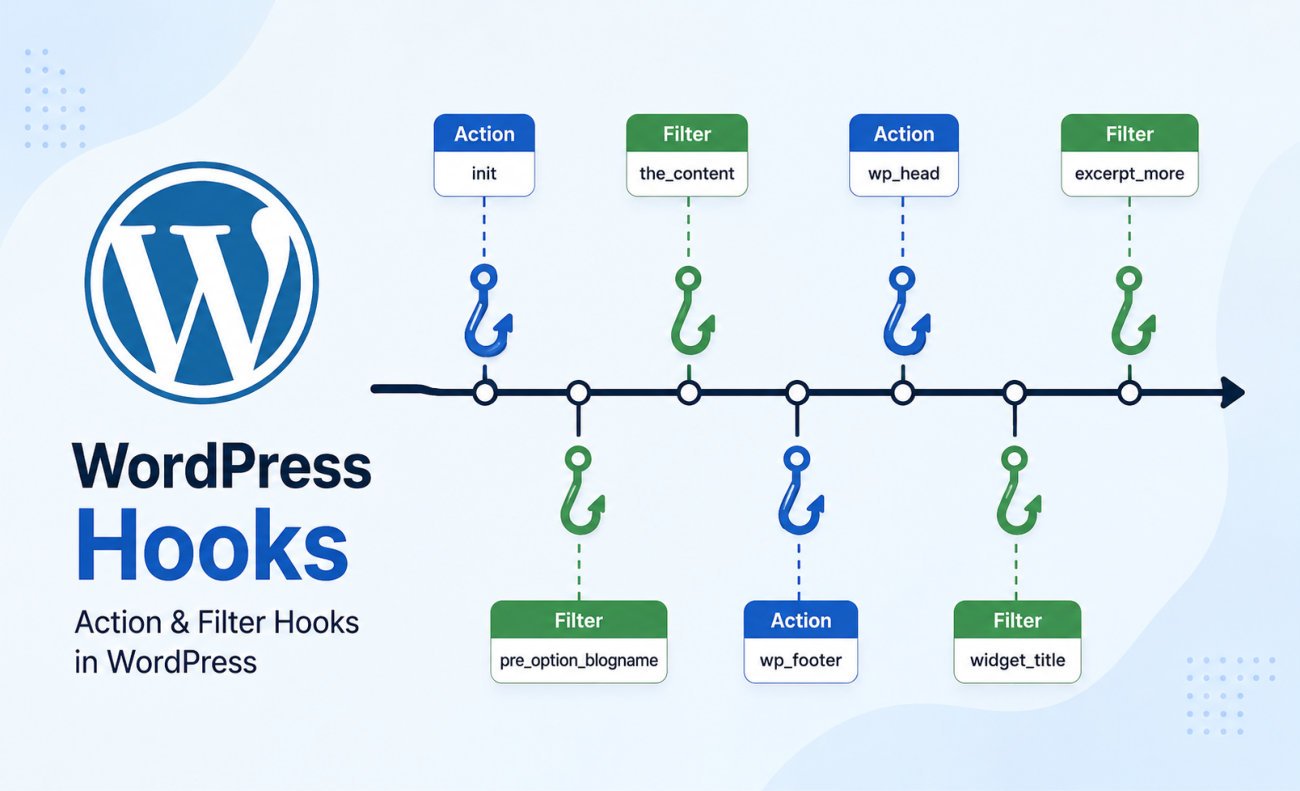
Hooks are the system that lets you customize WordPress without editing core files, and they come in two types. Actions let you run your own code at a specific point in WordPress, adding a script, sending an email, logging an event, and they don’t return anything, they just do the thing. Filters let you intercept and modify a piece of data, a post title, an excerpt, before it’s displayed or saved, and they must always return a value, modified or not. The simplest way to remember the difference: actions do things, filters change things. If you’ve followed our shortcodes or custom post types guides, you’ve already used a hook, add_shortcode() and register_post_type() both rely on this exact system underneath.
Before You Start
Make sure you have the following in place first:
- A recent backup (see our backup guide)
- WPCode installed, this is where you’ll add custom hook code safely
If you’ve worked through our shortcodes or custom post types guides, you already used a hook without us fully explaining what one actually is, add_action(‘init’, …) showed up in both. This is the article that finally explains what that line is actually doing, and why it matters more than it looks.
What You’ll Learn
- The simple mental model that makes actions and filters click
- The golden rule for filters, and what breaks if you forget it
- Why hooking everything to ‘init’ is a habit worth breaking, even though our own earlier guides used it
- How to write and safely register your first custom hook
The Simple Mental Model
WordPress executes its code in a sequence, loading the database, setting up plugins, loading the theme, generating the page. As it moves through that sequence, it “fires” hooks at specific points, moments where you’re allowed to plug in your own code. There are exactly two types:
- Actions let you do something at a specific moment, add a tracking script, send a notification when a post publishes, register something during setup. They don’t return anything, they just run.
- Filters let you change something WordPress is already processing, a title, an excerpt, a piece of content. They receive a value, and must return it, modified or untouched.
The simplest way to hold onto the difference: actions are verbs, filters are adjectives.
The Golden Rule for Filters: Always Return
Just like our shortcodes guide’s golden rule about returning instead of echoing, filters have their own version of this same principle, and it’s genuinely the most common mistake beginners make with them. A filter function must always return a value. If you forget to include a return statement, the value gets wiped out entirely, resulting in an empty title, a blank excerpt, or missing content, not an error message, just silently broken output.
function webgomu_add_title_prefix( $title ) {
    return '[New] ' . $title;
}
add_filter( 'the_title', 'webgomu_add_title_prefix' );
A Habit Worth Breaking (Even in Our Own Earlier Guides)
Worth being honest here: both our shortcodes and custom post types guides used the ‘init’ hook, and that’s genuinely correct for those specific tasks, it’s the standard, recommended hook for registering shortcodes and post types. But hooking everything to ‘init’ out of habit is a real, common beginner mistake beyond those specific cases. init fires quite early, before many WordPress functions, like checking the current logged-in user, are even available yet. For other tasks, more specific hooks exist and work better: wp_enqueue_scripts for loading scripts and styles, save_post for reacting to a post being saved, template_redirect for routing logic.
Understanding Priority
Both add_action() and add_filter() accept an optional priority parameter, defaulting to 10. Lower numbers run earlier. If two plugins hook into the same event, WordPress runs both, in priority order, this is genuinely why thousands of plugins can coexist on the same site without conflicting with each other.
Writing Your First Custom Hook
Add this to a new PHP snippet in WPCode, the same safe method used throughout this developer series, never directly in your theme’s functions.php file:
function webgomu_log_new_post( $post_ID ) {
    error_log( "New post published: $post_ID" );
}
add_action( 'publish_post', 'webgomu_log_new_post' );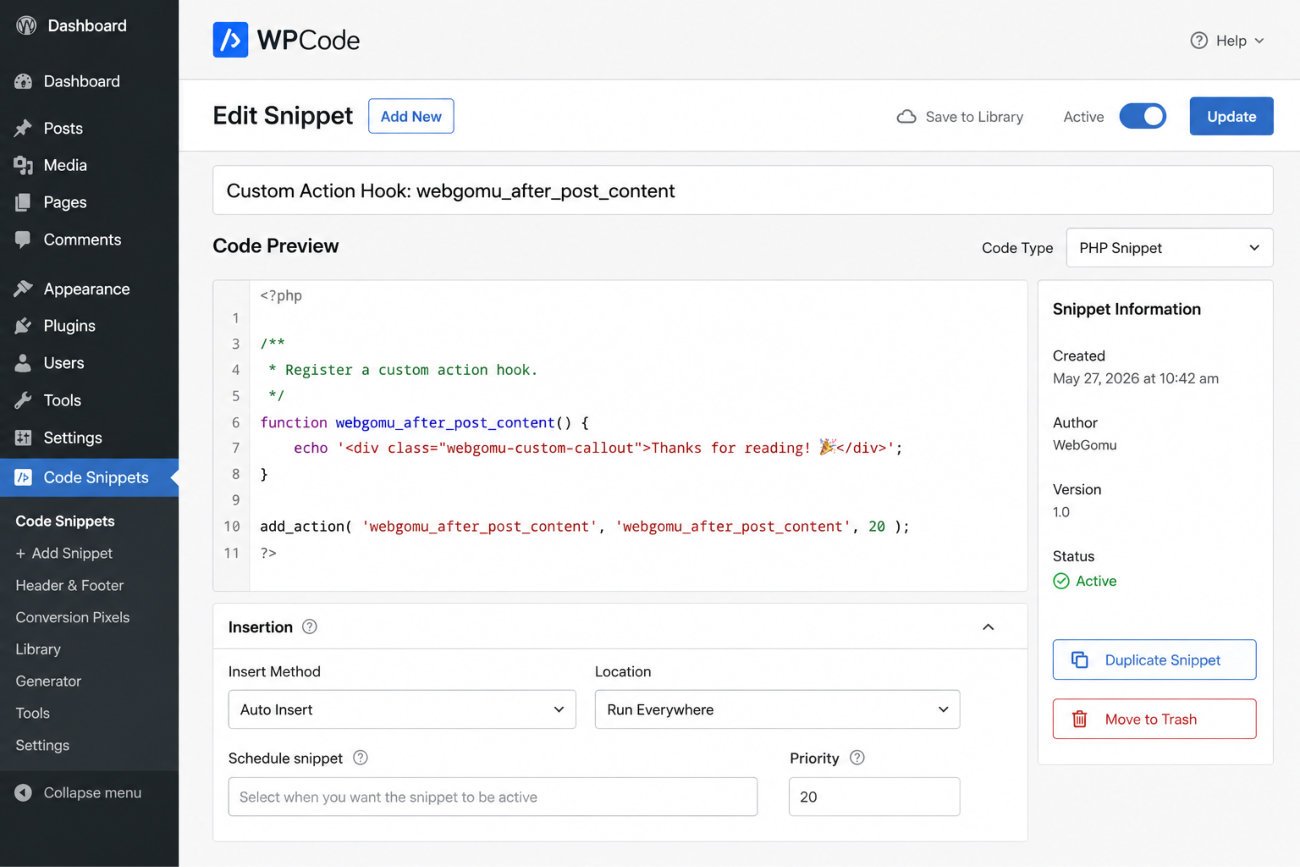
Avoiding Function Name Collisions
Always prefix your function names with something unique to your site, webgomu_your_function_name rather than just your_function_name. With over 2,000 hooks in WordPress core alone and potentially dozens of active plugins, generic function names risk colliding with something else already using the same name, causing a fatal error.
WebGomu Tip: When you’re not sure which hook to use for a specific task, the official WordPress code reference documents every hook with its parameters and real examples. It’s a genuinely better starting point than guessing, and it’s the same resource professional WordPress developers actually use.
Common Mistakes
- Forgetting to return a value inside a filter function, silently breaking the output instead of showing an error.
- Hooking every custom task to ‘init’ out of habit instead of choosing the most specific hook for the job.
- Using generic function names without a unique prefix, risking collisions with other plugins.
- Adding hook code directly to functions.php instead of using WPCode.
Recommended Tools
- WPCode — for safely adding custom hook code without editing theme files
- The official WordPress code reference — the most reliable source for finding the right hook for a specific task
Key Takeaways
- Actions do things and return nothing; filters change things and must always return a value.
- Forgetting to return inside a filter silently breaks the output, no error message appears.
- init works for registering shortcodes and post types, but isn’t the right default for every task.
- Always prefix custom function names uniquely to avoid collisions with other plugins.
Frequently Asked Questions
What’s the difference between an action and a filter in WordPress?
An action runs your code at a specific point and returns nothing, it just does something. A filter receives a piece of data, lets you modify it, and must always return a value, modified or untouched.
What happens if I forget to return a value in a filter function?
The value gets wiped out entirely, resulting in silently broken output, like an empty title or missing content, rather than a visible error message.
Is it always correct to hook custom code to ‘init’?
Not always. It’s the standard, correct hook for registering shortcodes and custom post types specifically, but for other tasks like loading scripts or handling post saves, more specific hooks exist and work better.
Why do function names need a unique prefix in WordPress?
With over 2,000 hooks in WordPress core and potentially dozens of active plugins, a generic function name risks colliding with another plugin’s function of the same name, causing a fatal error.
Can multiple plugins use the same hook without conflicting?
Yes, this is genuinely central to how the WordPress plugin ecosystem works. WordPress runs every function hooked to the same event in priority order, allowing many plugins to coexist safely.
Resources Links
Author:

Christoper Enolpe
Founder of WebGomu • WordPress Freelancer with 10+ Years of Experience
Christoper is the founder of WebGomu and a WordPress freelancer with over 10 years of hands-on experience building, optimizing, and maintaining WordPress websites. He writes practical, beginner-friendly guides based on real-world experience, covering WordPress, SEO, website performance, and AI tools to help readers build better websites with confidence.
Learn more: https://webgomu.com/about/
Get one WordPress tip every week
Start Here

The Ultimate Beginner’s Guide to WordPress (2026): Build Your First Website Without Coding
Popular Guides
Our Partner

More from the blog
How to Debug and Fix WordPress Critical Errors Safely (Without Crashing Live Sites)
Essential PHP Snippets to Remove WordPress Bloat and Improve Speed