MalCare Review 2026: Is the Free Version Actually Useful?

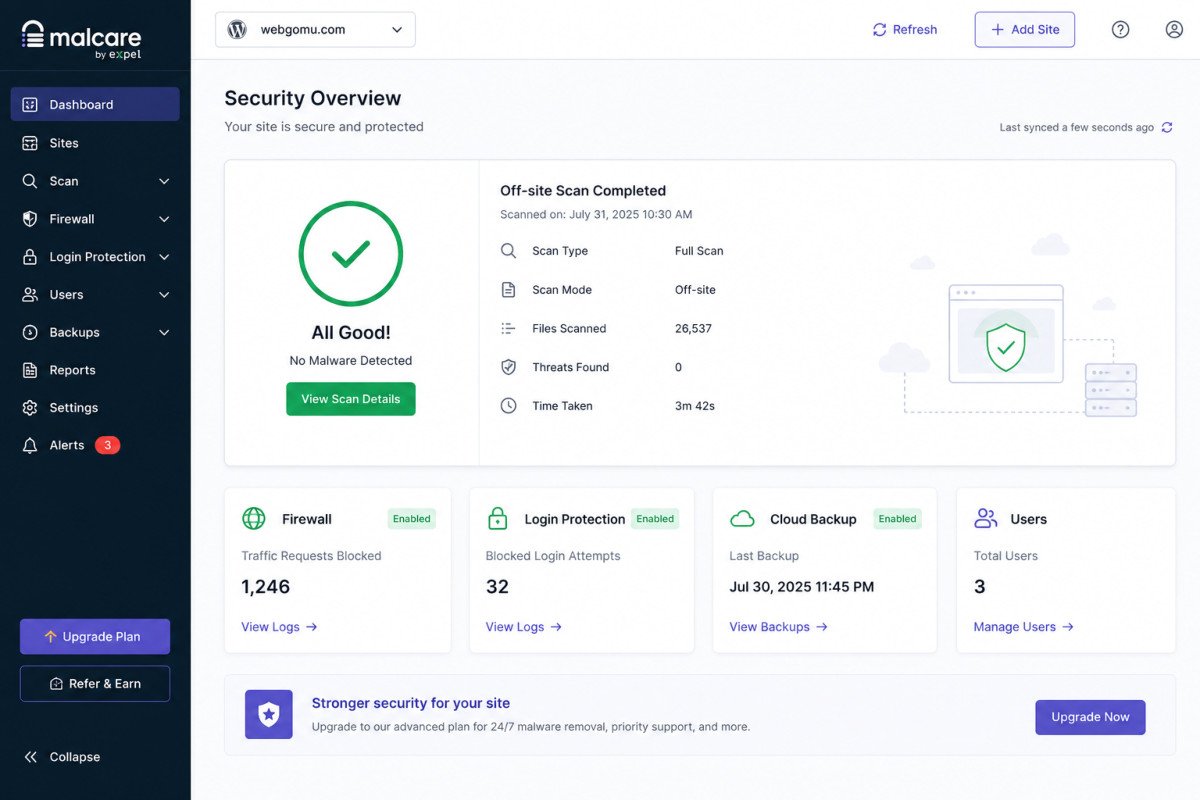
MalCare’s core architecture is genuinely clever: it scans your site by copying files to its own servers rather than scanning locally, which avoids the performance hit heavier scanners cause on your own hosting. Worth knowing clearly before installing it specifically for the free tier: independent reviews consistently note that MalCare’s most valuable capabilities, meaningfully fast cleanup and one-click malware removal, are tied to paid plans, not the free version. If you’re choosing MalCare expecting free, complete protection comparable to Wordfence’s free tier, that expectation doesn’t quite match what MalCare’s free version actually delivers.
Before You Start
See our security basics guide for the broader picture of a complete security setup, this review assumes you’re deciding specifically whether MalCare, free or paid, fits your situation.
MalCare markets itself as WordPress security without the complexity, install it, let it run, stop worrying. That pitch is genuinely appealing, and the underlying scanning architecture backs it up. But there’s a real gap between that marketing pitch and what the free tier specifically delivers, worth understanding clearly before you install it expecting full protection at no cost.
What You’ll Learn
- What genuinely stands out about MalCare’s off-site scanning approach
- What the free version actually includes, and what it doesn’t
- How MalCare connects to BlogVault for a combined protect-and-recover setup
- How pricing compares to Wordfence and Sucuri
What’s Genuinely Excellent
- Off-site scanning architecture. Most security plugins scan your files using your own server’s resources, which can slow your site during a comprehensive scan. MalCare copies files to its own servers and scans them there instead, a legitimate, verifiable architectural advantage for sites on limited shared hosting.
- Genuinely non-technical-friendly setup. No pages of settings to configure, a real relief if Wordfence’s more granular settings screens have felt overwhelming.
- Built by the team behind BlogVault, a widely used WordPress backup service. The two products integrate, giving you security and backups managed from a single dashboard, genuinely useful for agencies managing multiple sites.
- One-click malware removal, on paid plans, removes the scariest part of a security incident for non-technical users, no manually digging through infected files.
The Free Version’s Real Limits
This is worth being direct about: multiple independent reviews, based on hands-on testing rather than just reading the marketing page, describe MalCare’s free version as offering meaningfully less than its reputation suggests. The core, most valuable capabilities, fast cleanup and one-click removal specifically, are consistently reported as tied to paid plans. The free tier’s off-site scanning still offers real value (the lightweight architecture benefit still applies), but if your goal is genuinely free, complete protection including cleanup capability, that expectation doesn’t fully match what the free version delivers.
WebGomu Tip: If a fully free security plugin with genuine scanning and cleanup capability is your priority, Wordfence’s free tier (see our dedicated review) includes both at no cost, a more direct fit than MalCare’s free tier if budget is a hard constraint.
Pricing: Free vs. Paid Plans
| Tier | Price | Best For |
|---|---|---|
| Free | $0 | Off-site scanning specifically; limited beyond that |
| Paid (single site) | Roughly $99-$149/year, reported figures vary by source | Sites wanting genuine one-click cleanup and faster incident response |
Given the pricing variation across sources, confirm the current rate directly on MalCare’s own site before comparing against Wordfence (~$119-149/year) or Sucuri (~$199.99/year and up).
Who Should Use MalCare
Agencies and non-technical site owners specifically willing to pay for a genuinely guided, hands-off cleanup workflow, particularly if you’re already using or considering BlogVault for backups and want both managed from one dashboard.
Who Might Want to Look Elsewhere
If you want genuinely complete free protection, including real cleanup capability, Wordfence remains the more direct fit at no cost. If you specifically want a service-oriented, higher-touch security platform and don’t mind a higher price, Sucuri is worth shortlisting too, covered in our dedicated review.
Common Mistakes
- Installing MalCare’s free version expecting the same one-click cleanup capability its marketing and reputation suggest, that’s a paid feature.
- Assuming “lightweight” and “free and complete” mean the same thing, MalCare’s architecture is genuinely light on server resources, which isn’t the same as the free tier being feature-complete.
- Not comparing current pricing directly given the variation reported across sources.
- Choosing MalCare specifically for its cleanup reputation without confirming that capability requires a paid plan.
Key Takeaways
- MalCare’s off-site scanning architecture is a genuine, verifiable advantage for performance-conscious site owners.
- The free version’s most valuable capabilities, fast cleanup and one-click removal, are tied to paid plans.
- MalCare integrates with BlogVault for a combined security-and-backup dashboard, useful for agencies.
- For genuinely complete free protection, Wordfence remains the more direct fit.
Frequently Asked Questions
Is MalCare’s free version good enough for full protection?
Not fully. Independent reviews consistently note that MalCare’s most valuable capabilities, particularly one-click malware cleanup, are tied to paid plans rather than included free.
Does MalCare slow down my website like other security plugins?
Generally no, its scanning happens off-site on MalCare’s own servers rather than using your hosting’s resources, a genuine architectural advantage over plugins that scan locally.
Is MalCare related to BlogVault?
Yes, both products are built by the same company, and they integrate to offer combined security and backup management from a single dashboard.
How much does MalCare cost?
Reported pricing varies across sources, roughly $99 to $149 per year for a single site. Confirming the current rate directly on MalCare’s site is the most reliable approach.
Is Wordfence or MalCare better for free protection?
Wordfence’s free tier includes both scanning and firewall protection at no cost. MalCare’s free tier offers scanning, but its most valued cleanup capability requires a paid plan.
Resources Links
- The Ultimate Beginner’s Guide to WordPress (2026)
- 5 Best Free WordPress Security Plugins
- Wordfence Review 2026: Is the Free Version Enough?
- Sucuri Security Review 2026: What the Free Version Misses
Learn more directly from the source: Visit MalCare’s official website for current pricing and full feature details.
Author:

Christoper Enolpe
Founder of WebGomu • WordPress Freelancer with 10+ Years of Experience
Christoper is the founder of WebGomu and a WordPress freelancer with over 10 years of hands-on experience building, optimizing, and maintaining WordPress websites. He writes practical, beginner-friendly guides based on real-world experience, covering WordPress, SEO, website performance, and AI tools to help readers build better websites with confidence.
Learn more: https://webgomu.com/about/
Get one WordPress tip every week
Start Here

The Ultimate Beginner’s Guide to WordPress (2026): Build Your First Website Without Coding
Popular Guides
Our Partner

More from the blog

WPCode Review 2026: The Safe Way to Add Custom Code

AI Photo Editing Tools for WooCommerce Product Photos (2026)