Internal Linking Strategy for WordPress (2026 Guide)

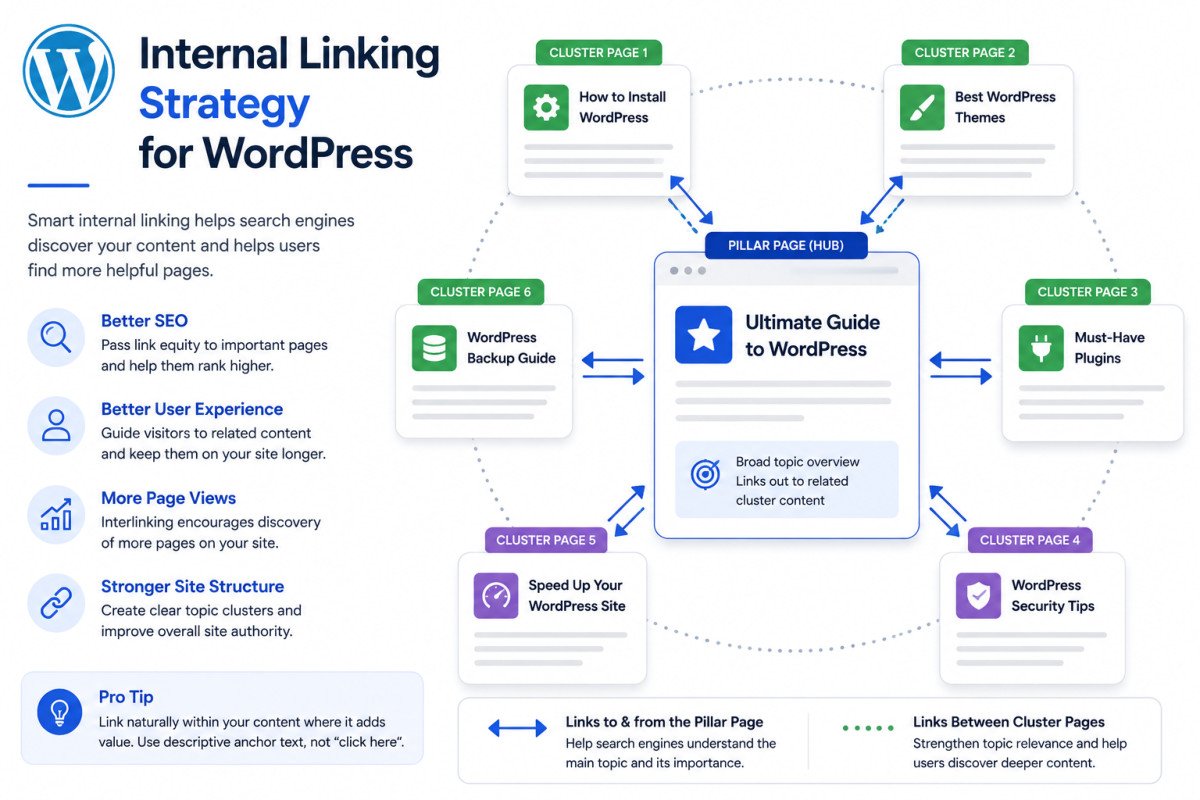
Internal linking connects related pages on your own site, distributing authority, helping search engines and AI systems understand which topics you genuinely cover in depth, and guiding readers to what they need next. The single highest-impact structure: a pillar-cluster model, where a comprehensive pillar page links out to every related cluster article, and each cluster article links back to the pillar. One analysis found sites using this hub-and-spoke structure saw AI citation rates for pillar topics increase from roughly 12% to 41%, a real, measurable difference in whether AI systems actually cite you as the authoritative source.
Before You Start
See our SEO checklist for the broader technical foundation, and our AI search optimization guide for how internal linking fits into the bigger AEO picture.
You can publish genuinely excellent, comprehensive content across dozens of articles, and still have search engines and AI systems seriously underestimate how much ground your site actually covers. The reason is usually structural, not content quality, your pages exist, but they’re not clearly connected to each other in a way that signals real depth.
What You’ll Learn
- The pillar-cluster model, and why it matters more for AI citation than traditional ranking alone
- How many internal links is actually too many
- How to write anchor text that genuinely helps rather than looks manipulative
- The most common internal linking failure, and how to catch it
The Pillar-Cluster Model: Links Both Ways
A pillar page covers a broad topic comprehensively and links out to every related cluster article beneath it. Each cluster article, in turn, links back to the pillar. This bidirectional structure does something a simple, one-directional list of links doesn’t: it signals genuine topical depth as one connected system, not a scattered collection of individually decent pages.
A Real Example of Why This Matters
This isn’t just theoretical. We’ve seen this exact gap play out on WebGomu itself, an AI Overview once described our site as covering only themes and basic setup, despite dozens of published articles spanning SEO, security, monetization, and automation. The content existed. The internal linking connecting it into a clearly recognizable structure didn’t, at least not yet. Strengthening pillar-to-cluster links is directly how that kind of gap gets fixed, not by writing more content, but by making the depth you already have genuinely visible and connected.
How Many Internal Links Is Too Many?
A practical, widely used benchmark: 2-5 contextual internal links per 1,000 words for standard content, up to 5-10 for genuinely long-form pieces. There’s no strict universal maximum, but keeping your total page link count, including navigation and footer, under roughly 150 helps avoid diluting the authority any single link passes along. Pages with hundreds of links crammed into a footer or sidebar see real diminishing returns.
Writing Anchor Text That Actually Works
Descriptive, natural anchor text that accurately reflects the destination page performs better than generic phrases like “click here” or “read more,” both for readers and for how search engines and AI systems interpret the connection. Use exact-match keyword anchors sparingly, overusing them starts to look manipulative rather than genuinely descriptive. Natural variation is both safer and more useful to an actual reader deciding whether to click.
The Most Common Failure: Orphan Pages
An orphan page has no internal links pointing to it from anywhere else on your site, effectively invisible to anyone browsing naturally, and harder for search engines to discover through normal crawling. This is consistently cited as the single most common internal linking failure. A periodic audit, even a manual review of your own site map every few months, catches these before they quietly become permanent dead ends.
Contextual vs. Navigational Links
Contextual links live inside your actual body content, connecting directly to what a specific paragraph is discussing. Navigational links appear in menus, footers, and breadcrumbs. Both matter, but contextual links carry more topical signal weight, they demonstrate a genuine, specific connection between two pieces of content, not just a standing site-wide structure.
WebGomu Tip: Before publishing a new article, take five minutes to check your existing content for genuine linking opportunities in both directions, link forward to relevant older articles, and if the topic warrants it, consider whether an older, foundational piece should eventually link forward to this new one too. Depth isn’t just about writing more, it’s about making sure what already exists is properly connected.
Common Mistakes
- Publishing genuinely comprehensive content that never gets connected into a clear pillar-cluster structure.
- Stuffing exact-match keyword anchor text repeatedly, which reads as manipulative rather than genuinely helpful.
- Never auditing for orphan pages, letting genuinely good content sit effectively invisible.
- Treating navigational menu links as sufficient, without any genuine contextual links within body content itself.
Recommended Tools
- Rank Math — includes built-in internal linking suggestions, see our setup guide
- Google Search Console — helps identify pages with unusually few internal links pointing to them
Key Takeaways
- The pillar-cluster model, bidirectional linking between a hub page and its related articles, is the highest-impact internal linking structure.
- One analysis found this structure lifted AI citation rates from roughly 12% to 41% for pillar topics.
- Aim for 2-5 contextual internal links per 1,000 words, with a practical ceiling around 150 total links per page.
- Orphan pages, content with zero internal links pointing to it, are the most common, easiest-to-fix internal linking failure.
Frequently Asked Questions
What is the pillar-cluster internal linking model?
A structure where a comprehensive pillar page links out to every related cluster article on a topic, and each cluster article links back to the pillar, creating a clearly connected, bidirectional hub rather than scattered, one-directional links.
How does internal linking affect AI citation, not just traditional SEO?
One analysis found sites using hub-and-spoke internal linking saw AI citation rates for pillar topics increase from roughly 12% to 41%, since the link structure gives AI systems a clearer, machine-readable signal about which page is the genuinely authoritative source on a topic.
How many internal links should a page have?
A practical benchmark is 2-5 contextual internal links per 1,000 words for standard content, up to 5-10 for long-form pieces, with a total page link ceiling around 150 to avoid diluting authority.
What is an orphan page?
A page with no internal links pointing to it from anywhere else on the site, making it effectively invisible to both readers browsing naturally and search engines crawling through normal site structure.
Should I use exact-match keywords as anchor text?
Sparingly. Descriptive, natural anchor text with some variation performs better and reads as genuinely helpful, overusing exact-match keyword anchors can look manipulative rather than useful.
Resources Links
Author:

Christoper Enolpe
Founder of WebGomu • WordPress Freelancer with 10+ Years of Experience
Christoper is the founder of WebGomu and a WordPress freelancer with over 10 years of hands-on experience building, optimizing, and maintaining WordPress websites. He writes practical, beginner-friendly guides based on real-world experience, covering WordPress, SEO, website performance, and AI tools to help readers build better websites with confidence.
Learn more: https://webgomu.com/about/
Get one WordPress tip every week
Start Here

The Ultimate Beginner’s Guide to WordPress (2026): Build Your First Website Without Coding
Popular Guides
Our Partner

More from the blog

Best WordPress SEO Plugins 2026: Compared & Ranked
WordPress Robots.txt: A Beginner’s Guide (2026)