All-In-One Security (AIOS) Review 2026: Check Your Server First

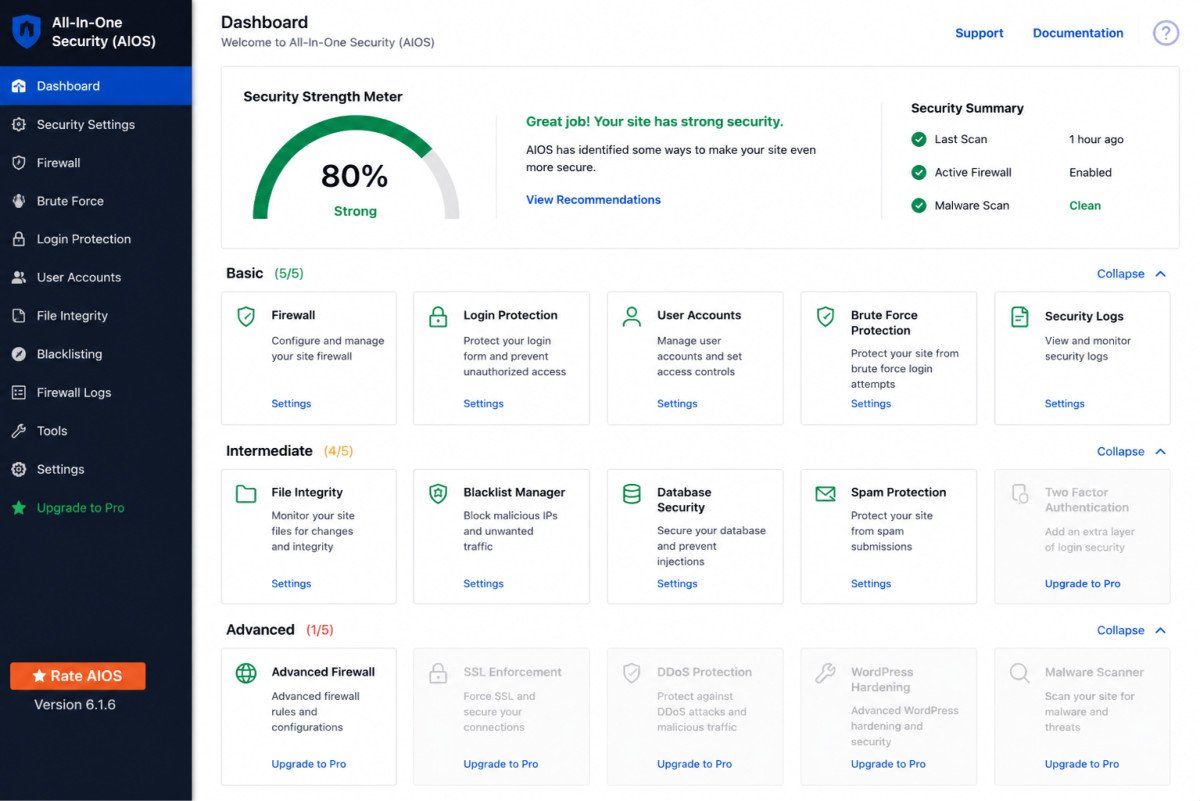
All-In-One Security (AIOS), built by the same team behind UpdraftPlus, is a genuinely generous free security plugin with login protection, multi-layered firewall rules, and a guided security strength meter. One critical limitation most comparisons skip: its free firewall (6G/8G rules from Perishable Press) relies on the .htaccess file, which only works on Apache servers, it’s non-functional on nginx. A second real gap: neither the free nor Premium version offers professional malware cleanup, if your site actually gets hacked, AIOS won’t help you recover it.
Before You Start
Check what web server your host runs (Apache or nginx) before relying on AIOS’s firewall specifically, this genuinely affects whether a core feature works at all. See our security basics guide for the broader picture of a complete security setup.
AIOS is developed by the same team behind UpdraftPlus, a real pedigree worth something in this space. But its free firewall has a specific technical dependency that could make it silently non-functional depending on your hosting stack, and it’s worth understanding clearly before you assume you’re covered.
What You’ll Learn
- What genuinely stands out about AIOS’s guided, beginner-friendly approach
- A critical firewall limitation tied directly to your server type
- What AIOS doesn’t do if your site actually gets hacked
- A real performance consideration if you enable every available module
What’s Genuinely Excellent
- Built by the UpdraftPlus team, the same developers behind the backup plugin we’ve reviewed separately, a real, verifiable track record in WordPress development.
- A genuinely useful security strength meter, visually rating your site’s current protection level and organizing features by difficulty, from basic to advanced, useful for beginners who don’t know where to start.
- Solid free-tier login protection, configurable lockout settings and two-factor authentication support for Google Authenticator, Microsoft Authenticator, and Authy.
- Premium pricing undercuts several competitors, at roughly $70/year, it’s positioned below Wordfence (~$119/year) and Sucuri (~$199.99/year) for comparable added features.
- Over 1 million active installations, a genuine trust signal at this scale.
A Critical Limitation: The Firewall Depends on Your Server Type
AIOS’s firewall uses 6G and 8G Firewall rules from Perishable Press, which operate through your site’s .htaccess file. That’s the catch: .htaccess only works on Apache servers. If your hosting runs nginx, a common setup on many performance-focused and cloud hosts, this firewall protection is effectively non-functional, silently, with no obvious warning that it isn’t working.
WebGomu Tip: Ask your host directly (or check your hosting control panel) whether your server runs Apache or nginx before assuming AIOS’s firewall is protecting you. This is a genuinely easy thing to overlook, and it’s exactly the kind of gap that only becomes obvious after something’s already gone wrong.
Another Real Gap: No Malware Cleanup
Neither the free nor Premium version includes malware cleaning or a professional cleanup service. If your site does get compromised, AIOS offers general advice but no actual removal capability, you’d need a separate tool or service to recover. This is worth knowing upfront, not discovering during an actual incident.
A Performance Consideration
AIOS includes over 100 individual security modules. Enabling all of them has been observed to add a measurable performance cost, reported around 10-15% Time to First Byte impact on shared hosting when fully loaded. Enable only the modules genuinely relevant to your site rather than turning everything on by default.
Pricing: Free vs. Premium
| Tier | Price | Best For |
|---|---|---|
| Free | $0 | Apache-hosted sites wanting guided, beginner-friendly hardening and login protection |
| Premium | ~$70/year | Sites wanting weekly automated malware scanning, uptime monitoring, and country blocking |
Worth noting: even Premium’s malware scanning runs on a weekly schedule, not continuous or real-time, a meaningful difference from scanners designed around more frequent checks.
Who Should Use AIOS
Beginners on Apache-based shared hosting wanting a genuinely guided, step-by-step approach to hardening their site, paired with the confidence of a well-known development team.
Who Might Want to Look Elsewhere
If you’re on nginx hosting, AIOS’s core firewall advantage doesn’t apply to you, worth checking Wordfence instead, which doesn’t share this server dependency. If actual malware cleanup capability matters, neither AIOS tier provides it, worth pairing with or choosing a tool that does.
Common Mistakes
- Assuming AIOS’s firewall is active without checking whether your hosting actually runs Apache.
- Enabling all 100+ available modules by default instead of only what’s genuinely relevant, incurring unnecessary performance cost.
- Expecting malware cleanup help from AIOS if your site is compromised, neither tier provides it.
- Treating Premium’s weekly scan schedule as equivalent to continuous, real-time scanning.
Key Takeaways
- AIOS’s free firewall only functions on Apache servers, a critical, easy-to-miss limitation on nginx hosting.
- Neither tier includes malware cleanup, plan for a separate recovery solution if your site is ever compromised.
- Enabling every available module carries a real, measurable performance cost on shared hosting.
- Built by the UpdraftPlus team, a genuine, verifiable development track record.
Frequently Asked Questions
Does AIOS’s firewall work on all hosting?
No, its free firewall relies on the .htaccess file, which only functions on Apache servers. It’s non-functional on nginx, worth confirming your server type before relying on it.
Can AIOS clean up my site if it gets hacked?
No, neither the free nor Premium version includes malware cleaning or a professional cleanup service, only general advice.
Who develops All-In-One Security?
The same team behind UpdraftPlus, a widely used WordPress backup plugin, a genuine, verifiable development track record in the WordPress ecosystem.
Does enabling all of AIOS’s features slow down my site?
It can, enabling all 100+ available modules has been observed to add a measurable performance cost on shared hosting. Enabling only genuinely relevant modules helps minimize this.
Is AIOS Premium cheaper than Wordfence Premium?
Yes, at roughly $70/year, it’s positioned below Wordfence’s roughly $119/year and Sucuri’s roughly $199.99/year for comparable added features.
Resources Links
- The Ultimate Beginner’s Guide to WordPress (2026)
- 5 Best Free WordPress Security Plugins
- UpdraftPlus Review 2026: Do You Even Need It?
- Wordfence Review 2026: Is the Free Version Enough?
Learn more directly from the source: Visit AIOS’s official page for current pricing and full feature details.
Author:

Christoper Enolpe
Founder of WebGomu • WordPress Freelancer with 10+ Years of Experience
Christoper is the founder of WebGomu and a WordPress freelancer with over 10 years of hands-on experience building, optimizing, and maintaining WordPress websites. He writes practical, beginner-friendly guides based on real-world experience, covering WordPress, SEO, website performance, and AI tools to help readers build better websites with confidence.
Learn more: https://webgomu.com/about/
Get one WordPress tip every week
Start Here

The Ultimate Beginner’s Guide to WordPress (2026): Build Your First Website Without Coding
Popular Guides
Our Partner

More from the blog

WPCode Review 2026: The Safe Way to Add Custom Code

AI Photo Editing Tools for WooCommerce Product Photos (2026)