Image SEO: How to Rank in Google Images


To optimize images for Google Images, rename image files descriptively before uploading (like tropical-smoothie-recipe.jpg instead of IMG_4821.jpg), write natural, descriptive alt text for every meaningful image, compress and convert to WebP for faster loading, and keep “Include Images” enabled in your sitemap settings. Google Images is a significant, often-ignored source of search traffic, and most WordPress sites leave it entirely on the table by skipping these basics.
Before You Start
Make sure you have the following in place first:
- An SEO plugin installed, like Rank Math (see our setup guide), with “Include Images” enabled in your sitemap settings
- Access to rename files before uploading them to your Media Library
Google Images drives a meaningful share of all web search traffic, yet most sites treat it as an afterthought. Images get uploaded straight from a phone or camera with generic filenames like IMG_4821.jpg, no descriptive alt text, and no thought given to format or compression. That’s a real, missed opportunity, and it’s genuinely simple to fix going forward.
What You’ll Learn
- Why your image filename matters before you even upload it
- How to write alt text that’s genuinely useful, not keyword-stuffed
- Which image format to use, and why it affects both SEO and speed
- How image sitemaps help Google discover your images
1. Rename Your Image Files Before Uploading
Your filename is the first signal Google reads about an image, before it even looks at your page’s content. A file named IMG_4821.jpg tells Google nothing. A file named wordpress-dashboard-screenshot.jpg tells Google exactly what it’s looking at.
- Use lowercase letters
- Separate words with hyphens, not underscores or spaces
- Include your primary keyword naturally, without stuffing multiple keywords into one filename
This has to happen before upload, renaming a file after it’s already in your Media Library and embedded in a post doesn’t retroactively update the URL WordPress generated.
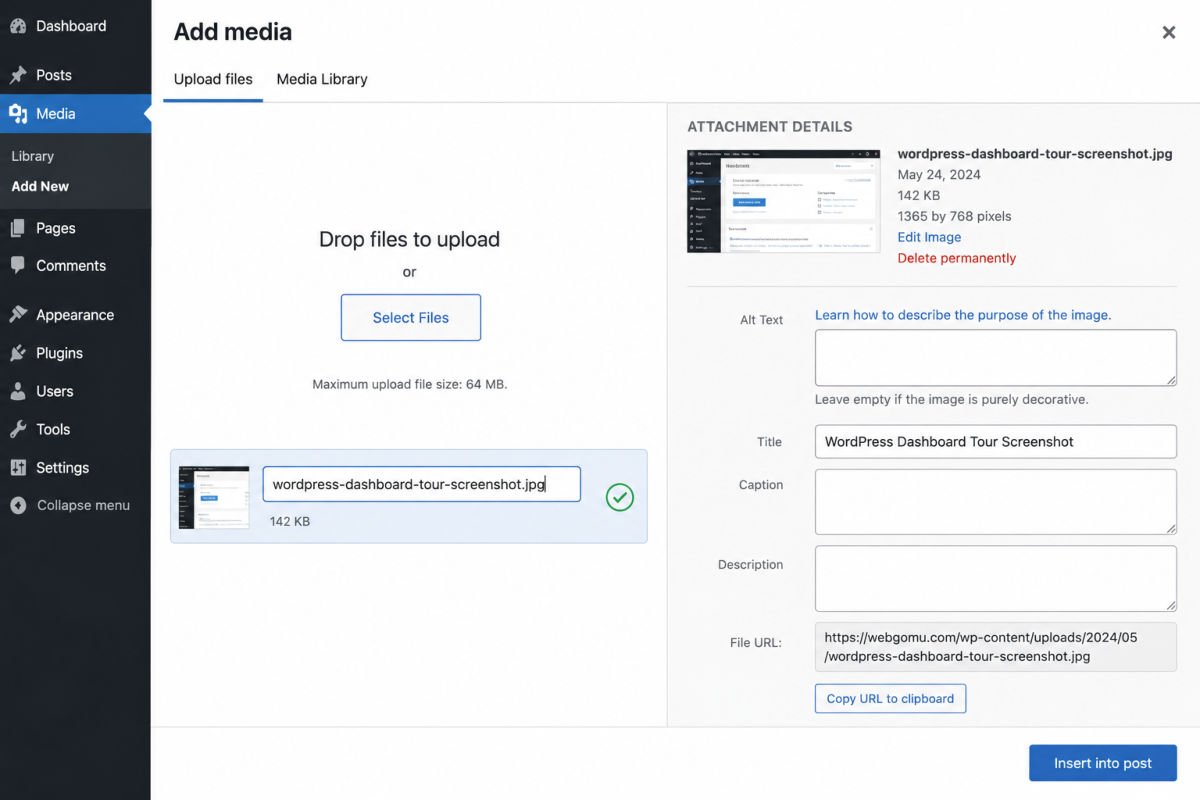
2. Write Genuinely Descriptive Alt Text
Alt text describes an image for search engines and for visitors using screen readers. Google has confirmed it’s a real ranking factor for image search specifically.
- Start with the subject, skip filler phrases like “image of” or “photo showing”
- Keep it natural and concise, roughly 80-125 characters is a reasonable target
- Include your primary keyword once, naturally, never stuffed or repeated
- Leave decorative images (borders, spacers, background patterns) with empty alt text (alt=””), so screen readers skip over them appropriately
Example: instead of “image of wordpress dashboard wordpress dashboard screenshot,” write something like “WordPress dashboard home screen showing the left sidebar menu.”
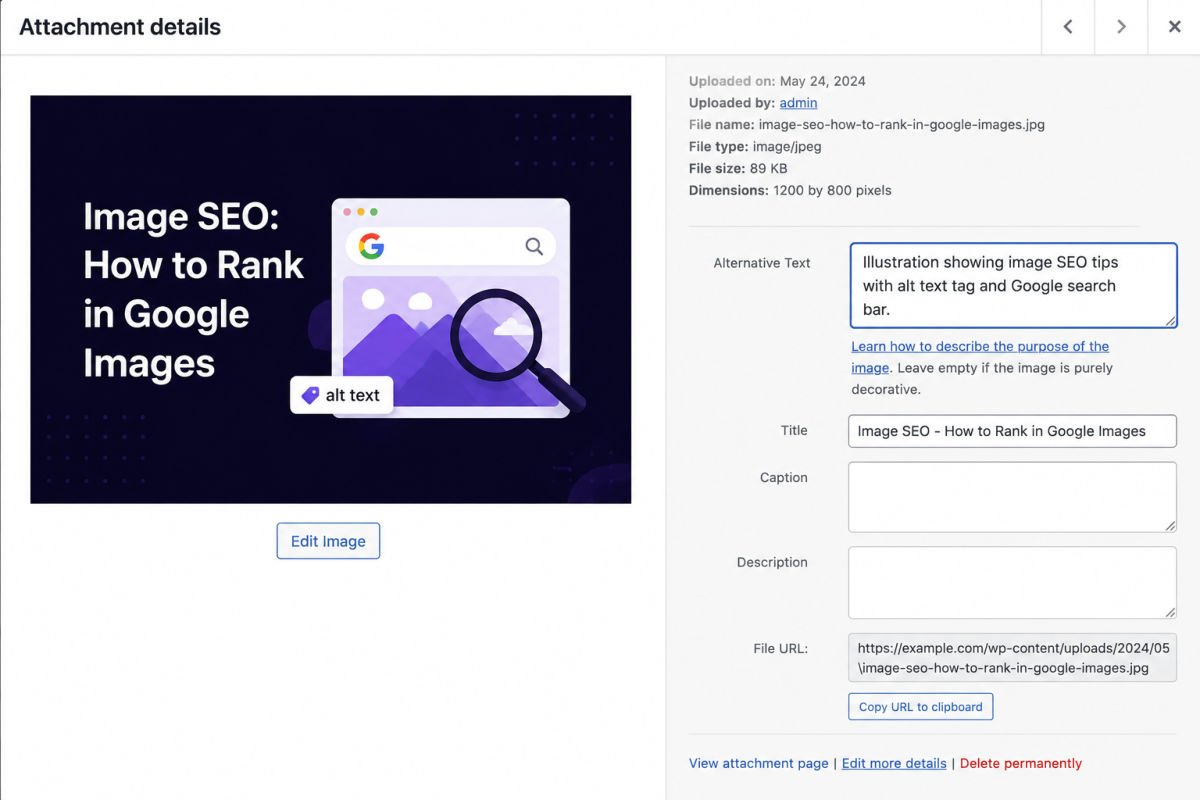
3. Add Alt Text in WordPress
- Open the image in your Media Library, or click it within a post.
- Find the Alt Text field in the image settings panel.
- Write a natural, descriptive sentence, not just a list of keywords.
WebGomu Tip: If you have a backlog of older images with generic filenames and empty alt text, don’t try to fix everything at once. Prioritize images on your highest-traffic pages first, that’s where the real SEO benefit shows up fastest.
4. Choose the Right Format and Compress Before Uploading
WebP is the current standard default format for most images, offering meaningfully smaller file sizes than JPG or PNG at comparable visual quality. Smaller file sizes mean faster page loads, which affects both user experience and your Core Web Vitals scores. See our speed optimization guide for the full picture on image compression.
5. Keep Image Sitemaps Enabled
An image sitemap helps Google discover images that might otherwise be missed during a regular crawl, especially ones loaded dynamically. If you’re using Rank Math, this is the “Include Images” toggle in your sitemap settings, on by default, worth double-checking it hasn’t been turned off.
Troubleshooting
My images aren’t showing up in Google Images at all
Confirm your sitemap includes images (check your SEO plugin’s sitemap settings), and that the page containing the image is actually indexed. An unindexed page means its images won’t be discovered either.
I have hundreds of old images with no alt text, where do I start?
Start with your highest-traffic pages first, rather than trying to fix your entire Media Library at once. A plugin that bulk-audits missing alt text can help identify gaps faster than checking manually.
Does adding alt text actually help if my images are decorative?
No, and it shouldn’t. Purely decorative images (spacers, background patterns) should have empty alt text specifically, so screen readers skip them rather than reading out irrelevant descriptions.
Common Mistakes
- Uploading images with generic camera or phone filenames, then never renaming them.
- Keyword-stuffing alt text instead of writing a natural, accurate description.
- Uploading large, uncompressed images straight from a phone or camera.
- Leaving genuinely decorative images with generic or empty-but-required alt text mismatched to their actual purpose.
Recommended Tools
- Rank Math’s built-in image sitemap setting — no extra plugin needed for the sitemap piece specifically
- An image compression/WebP conversion plugin — see our speed guide for the setup steps
Key Takeaways
- Rename image files descriptively before uploading, not after.
- Write natural, concise alt text, never keyword-stuffed, and leave decorative images empty.
- WebP is the current default standard format for both speed and quality.
- Keep image sitemaps enabled so Google can discover images it might otherwise miss.
Frequently Asked Questions
Does alt text actually affect Google rankings?
Yes, Google has confirmed alt text is a genuine ranking factor specifically for image search, in addition to its accessibility benefits for screen reader users.
Should every image on my site have alt text?
Every meaningful content image should. Purely decorative images (borders, spacers, background patterns) should have empty alt text instead, so screen readers skip them appropriately.
What image format should I use in 2026?
WebP is the current default standard for most images, offering strong compression with minimal visible quality loss compared to JPG or PNG.
Can I rename an image after it’s already uploaded?
Not effectively. Renaming needs to happen before upload, since WordPress generates the image’s URL from the filename at the time it’s added to your Media Library.
Do I need a dedicated image SEO plugin?
Not necessarily. A general SEO plugin like Rank Math covers the sitemap and basic image SEO needs for most sites. Dedicated image SEO plugins add convenience, like bulk AI-generated alt text, but aren’t required to get the fundamentals right.
Resources Links
Author:

Christoper Enolpe
Founder of WebGomu • WordPress Freelancer with 10+ Years of Experience
Christoper is the founder of WebGomu and a WordPress freelancer with over 10 years of hands-on experience building, optimizing, and maintaining WordPress websites. He writes practical, beginner-friendly guides based on real-world experience, covering WordPress, SEO, website performance, and AI tools to help readers build better websites with confidence.
Learn more: https://webgomu.com/about/
Get one WordPress tip every week
Start Here

The Ultimate Beginner’s Guide to WordPress (2026): Build Your First Website Without Coding
Popular Guides
Our Partner

More from the blog
Best WordPress SEO Plugins 2026: Compared & Ranked
Internal Linking Strategy for WordPress (2026 Guide)