Sucuri Security Review 2026: What the Free Version Misses

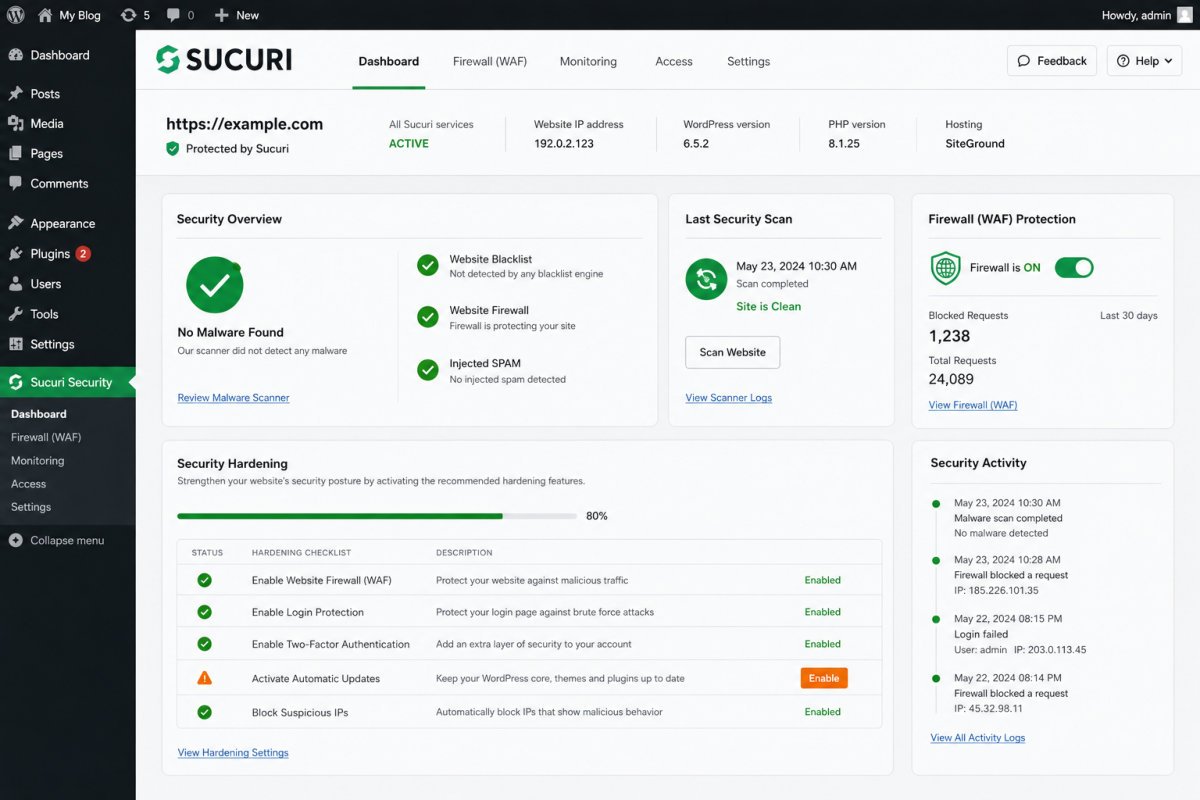
Sucuri is a genuinely capable, well-regarded WordPress security service, but its free plugin covers far less than its paid platform. As flagged in our security plugins roundup, the free version doesn’t include Sucuri’s Web Application Firewall at all, that’s a separate paid product. The free remote scanner also can’t detect malware hidden in server-side files or databases, full scanning requires a paid subscription. Verified users consistently praise the unlimited malware cleanup guarantee on paid plans, but pricing (starting around $199.99/year) and notably inconsistent reports on support responsiveness are worth weighing carefully.
Before You Start
See our security basics guide for the broader picture of what a solid WordPress security setup needs, this review assumes you’re deciding specifically whether Sucuri fits your situation.
Sucuri shows up constantly in security plugin roundups, including our own. But its free and paid tiers cover meaningfully different ground, and understanding exactly where that line sits matters more than the brand name itself.
What You’ll Learn
- What genuinely stands out about Sucuri’s paid platform
- Exactly what the free version does and doesn’t include
- Why support quality reports are notably inconsistent, and what that means for you
- How pricing actually breaks down across tiers
What’s Genuinely Excellent
- Unlimited malware cleanup guarantee. Paid plans include unlimited manual cleanups for a year, a real cost advantage over competitors that charge per incident.
- DNS-level Web Application Firewall. Sucuri’s WAF blocks threats before they reach your server, which also reduces server load, a genuine architectural advantage over firewalls that run inside WordPress itself.
- Built-in CDN. Multiple verified reviewers note a real performance and loading speed improvement after implementation.
- Accurate file integrity monitoring, with verified reports of minimal false positives when detecting unauthorized WordPress file changes.
- The free plan offers genuine value, audit logging and basic hardening presets, more than many freemium security plugins provide at no cost.
What the Free Version Actually Doesn’t Include
This is the detail most comparison lists skip. Sucuri’s free plugin does not include the Web Application Firewall, that’s a separate paid product entirely. The free plan’s remote SiteCheck scanner also has a real limitation: it cannot detect malware hidden in server-side files or databases, only full paid scanning covers that. If you install the free version expecting Wordfence-level free firewall protection, you’ll have a real coverage gap without realizing it.
What Real Users Flag as Frustrating
- Pricing is a consistent complaint, particularly for solopreneurs and small businesses. Multiple independent reviewers describe the annual cost as difficult to justify for a single small site.
- WAF setup requires changing DNS nameservers or A records, a real technical barrier for beginners, with propagation delay adding further friction during setup.
- Dashboard UI feels dated compared to newer competitors like MalCare, according to more recent reviews.
- Scaling concerns for complex sites. At least one detailed reviewer specifically cautioned against Sucuri for sites with APIs or user login systems, describing it as difficult to scale for that kind of complexity.
A Genuinely Polarized Point: Support Quality
This is worth being fully honest about rather than picking a side: reports on Sucuri’s customer support are notably inconsistent across review platforms. Some verified reviewers describe support as responsive and knowledgeable. Others report significant delays, 24 to 48 hours for ticket responses in some cases, live chat described as ineffective, and occasional technical difficulties during setup like failed firewall activation. Given this genuine inconsistency, if support responsiveness matters a lot to your situation, it’s worth checking recent reviews specifically at the time you’re evaluating, rather than assuming either extreme applies to you.
WebGomu Tip: If you’re on the free plan specifically for the hardening and audit features, that’s a reasonable, genuinely useful choice. Just don’t assume it’s covering your firewall too, pair it with your host’s own protections or a separate firewall solution if you’re not paying for Sucuri’s platform tier.
Pricing: Free vs. Platform Plans
| Tier | Price | Best For |
|---|---|---|
| Free (plugin only) | $0 | Auditing and basic hardening, not full firewall protection |
| Basic Platform | ~$199.99/year | Sites wanting the full WAF, CDN, and cleanup guarantee |
| Pro Platform | ~$299.99/year | Higher-traffic or business-critical sites |
| Business Platform | ~$499.99/year | Agencies or larger organizations managing multiple sites |
Who Should Use Sucuri
Agencies or businesses managing multiple sites benefit most from the unlimited cleanup guarantee, one incident (or several) doesn’t mean unexpected additional cost. It’s also a genuinely strong fit if DNS-level firewall protection and a built-in CDN are priorities.
Who Might Want to Look Elsewhere
If you specifically want strong firewall protection in a genuinely free tier, Wordfence is the more direct fit, covered in our dedicated Wordfence review. If dashboard polish and a lighter footprint matter most, MalCare is worth comparing too.
Common Mistakes
- Installing Sucuri’s free plugin expecting full firewall protection, it’s a separate paid product.
- Assuming the free SiteCheck scanner covers server-side or database malware, it doesn’t.
- Not checking current, recent reviews for support responsiveness before relying on it for a time-sensitive issue.
- Choosing Sucuri for a complex site with APIs or user accounts without researching scalability concerns first.
Key Takeaways
- Sucuri’s free plugin covers auditing and hardening, not firewall protection, that’s a separate paid product.
- The unlimited cleanup guarantee on paid plans is a genuine cost advantage over per-incident competitors.
- Support quality reports are notably inconsistent across review platforms, worth checking recent feedback directly.
- Pricing is a consistent pain point for small, single-site users specifically.
Frequently Asked Questions
Does Sucuri’s free plugin include a firewall?
No, this is a common point of confusion. The free plugin covers auditing and hardening, while the Web Application Firewall is a separate paid platform product.
Is Sucuri’s customer support reliable?
Reports are genuinely inconsistent, some verified users describe support as responsive, others report significant delays. Checking recent reviews directly is worth doing if support quality matters to your decision.
Is Sucuri worth the price for a single small site?
It can feel expensive for a single small site compared to free alternatives. It becomes a stronger value proposition for agencies managing multiple sites, thanks to the unlimited cleanup guarantee.
Can Sucuri’s free scanner detect all types of malware?
No, the free SiteCheck scanner cannot detect malware hidden in server-side files or databases. Full scanning coverage requires a paid subscription.
Is Sucuri or Wordfence better for free firewall protection?
Wordfence includes a functional firewall in its free tier. Sucuri’s free plugin does not, its firewall is only available on paid platform plans.
Resources Links
- The Ultimate Beginner’s Guide to WordPress (2026)
- 5 Best Free WordPress Security Plugins
- Wordfence Review 2026: Is the Free Version Enough?
- WordPress Security Basics: How to Protect Your Site
Learn more directly from the source: Visit Sucuri’s official website for current pricing and full feature details.
Author:

Christoper Enolpe
Founder of WebGomu • WordPress Freelancer with 10+ Years of Experience
Christoper is the founder of WebGomu and a WordPress freelancer with over 10 years of hands-on experience building, optimizing, and maintaining WordPress websites. He writes practical, beginner-friendly guides based on real-world experience, covering WordPress, SEO, website performance, and AI tools to help readers build better websites with confidence.
Learn more: https://webgomu.com/about/
Get one WordPress tip every week
Start Here

The Ultimate Beginner’s Guide to WordPress (2026): Build Your First Website Without Coding
Popular Guides
Our Partner

More from the blog
WooCommerce Checkout Optimization: Reduce Cart Abandonment
WooCommerce Payment Gateways: Setup & Comparison (2026)